
Multi-Tenant SaaS Architecture: What to Decide Early Before You Scale
June 10, 2026
Multi-tenant SaaS architecture is one of those decisions that looks deceptively simple at the start and becomes expensive to change later. At a high level, the appeal is obvious: shared infrastructure can improve efficiency, reduce operating cost, and make it easier to ship product updates quickly. Cloud providers continue to emphasize that multitenancy is a core economic advantage of cloud platforms, while SaaS architecture guidance from AWS and Microsoft consistently frames tenant isolation, scale, and manageability as the central trade-offs to get right early. (learn.microsoft.com)
For most software companies, the real question is not whether to build multi-tenant forever or single-tenant forever. It is how much sharing to allow, where to draw the lines, and how to design for the day when one tenant grows large enough to need special treatment. The best SaaS teams make these decisions intentionally rather than accidentally. They define what is shared, what is isolated, what can be migrated later, and what should never be compromised for speed. That clarity pays off in better security, cleaner operations, simpler support, and more predictable margins. (docs.aws.amazon.com)
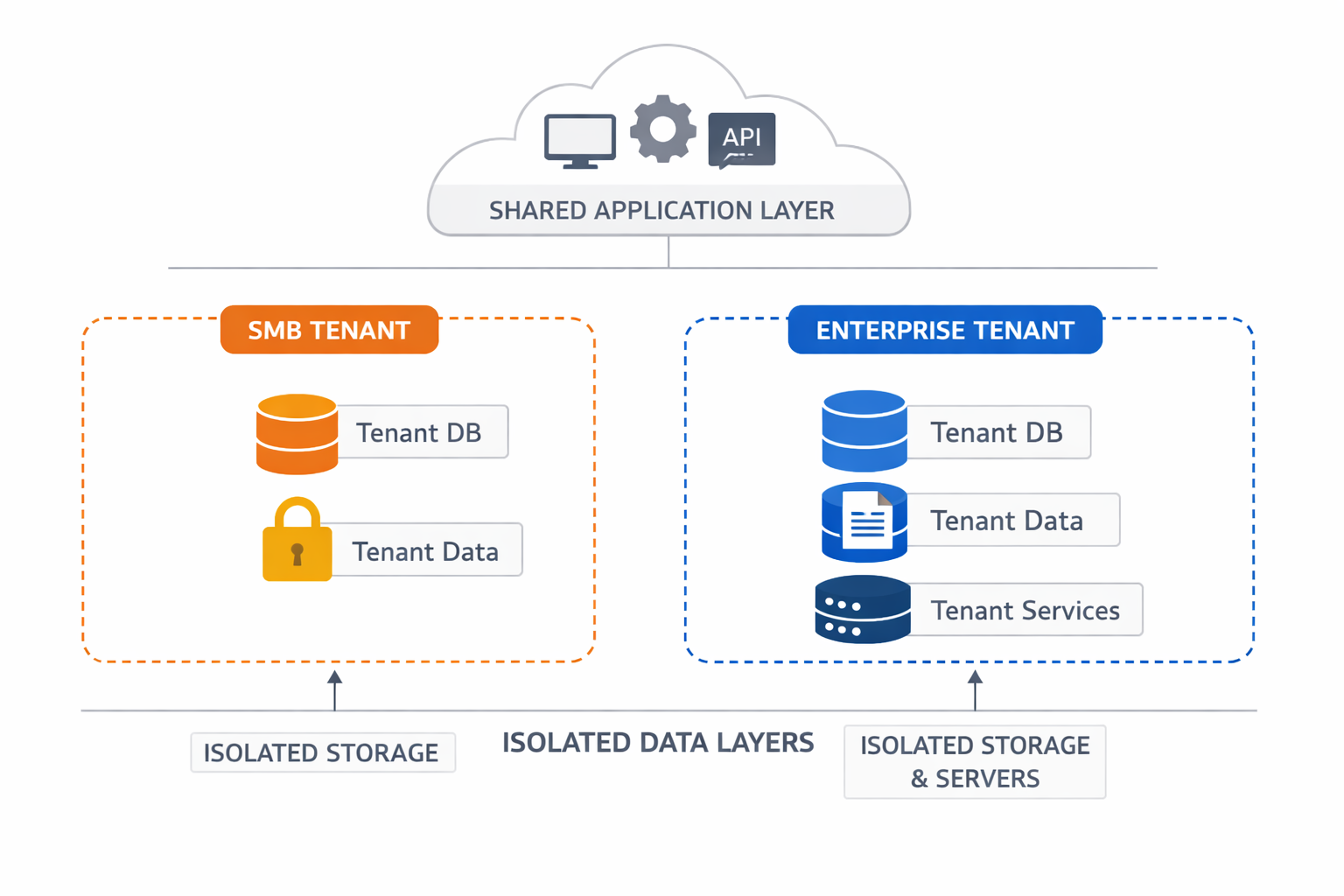
1. Why multi-tenant SaaS architecture is still the default growth strategy
Multi-tenancy remains the default growth strategy because it aligns product delivery, infrastructure economics, and operational scale. In a shared model, one codebase and one platform can serve many customers, which makes feature rollout, patching, monitoring, and capacity planning far more efficient than operating separate stacks per customer. AWS describes multi-tenancy as a way to achieve cost and operational efficiency in shared environments, while Azure notes that sharing infrastructure among multiple customers is a major economic benefit of cloud computing. (docs.aws.amazon.com)
That efficiency matters more as a SaaS business grows. When every new customer requires dedicated infrastructure, the support burden increases, deployments multiply, and margins can erode quickly. Shared infrastructure lets vendors absorb growth without linear increases in ops work. Azure’s multitenant architecture guidance also highlights the practical reality: full isolation for every tenant can work at small scale, but it often becomes costly and difficult to manage as tenant count rises. (learn.microsoft.com)
The market direction also reinforces the model. Google Cloud’s SaaS guidance explicitly frames modern SaaS optimization around revenue growth, architecture, operations, and security, all while preserving the efficiency benefits of multi-tenant platforms. That is a strong signal that vendors are not abandoning multitenancy; they are refining it. The modern pattern is not “share everything.” It is “share by default, isolate where necessary.” (cloud.google.com)
A good way to think about it is that multi-tenancy is less a single architecture and more a spectrum. You can share application code, data planes, compute pools, observability stacks, or support workflows in different combinations. Azure explicitly describes isolation as a continuum, not a binary choice. That is why successful SaaS teams decide early which parts of the system need strong tenant boundaries and which parts can safely stay pooled for efficiency. (learn.microsoft.com)
2. Choose your tenancy model early: single-tenant vs multi-tenant, and pooled, siloed, or hybrid placement
Choosing the tenancy model early is one of the most important architectural decisions you will make. A single-tenant model gives each customer their own dedicated stack, which can simplify compliance conversations and reduce the chance of cross-tenant impact. But it usually increases cost and operational complexity. Microsoft notes that isolated deployments can work well for a small number of tenants, but they typically lack cost efficiency and become harder to manage at scale. (learn.microsoft.com)
A multi-tenant model shares some or most infrastructure across customers. That can range from a fully pooled design, where many tenants share the same app and data resources, to a fully siloed design, where each tenant gets separate infrastructure, with hybrid patterns in between. AWS guidance explicitly recognizes hybrid architectures, where high-traffic or high-value customers may get siloed infrastructure while quieter customers stay in pooled or shared environments. (docs.aws.amazon.com)
The right choice depends on three big questions:
Isolation: How bad would a cross-tenant failure or data exposure be?
Compliance: Do some customers require dedicated infrastructure, specific regions, or stricter controls?
Cost: Can the unit economics support separate stacks for every customer, or do you need sharing to stay competitive?
Azure’s multitenant documentation recommends evaluating trade-offs across scale, isolation, cost efficiency, performance, implementation complexity, and manageability. That framing is useful because it keeps the decision grounded in business realities, not ideology. (learn.microsoft.com)
In practice, many SaaS companies end up with a hybrid model. Early-stage customers may live in pooled infrastructure. Enterprise customers may move to dedicated tenants, dedicated databases, dedicated regions, or even dedicated deployment stamps. This is often the most practical long-term pattern because it preserves operating efficiency without blocking higher-value deals that demand stronger isolation. (learn.microsoft.com)
3. Define tenant isolation boundaries: app, database, schema, storage, network, identity, and compute
Tenant isolation is not the same thing as authentication or authorization. That distinction is easy to miss early and painful to fix later. AWS is explicit that a user being authenticated does not mean tenant isolation has been achieved; isolation is a separate architectural property that blocks one tenant from accessing another tenant’s resources. (docs.aws.amazon.com)
The right way to plan isolation is layer by layer:
Application layer
Decide whether each tenant shares the same application instance or gets a dedicated one. Shared app tiers are cheaper and simpler to operate, but dedicated app instances can reduce noisy-neighbor effects and make certain compliance requirements easier to satisfy. Azure’s multitenant guidance treats application sharing as one of several valid options, not the only model. (learn.microsoft.com)
Database layer
You may isolate by database, by schema, or by row-level tenant IDs. Each has different trade-offs in manageability, performance, and blast radius. Database isolation is often the strongest and simplest boundary to explain to security teams, but it comes with more operational overhead. Shared databases can be efficient, but they require disciplined query design and strong guardrails. (learn.microsoft.com)
Storage layer
Object storage, file storage, and backups also need tenant-aware separation. A common mistake is to isolate the app and database while leaving export buckets or backup systems loosely controlled. That creates hidden cross-tenant risk. Azure’s guidance includes storage and data as a distinct multitenancy category for exactly this reason. (learn.microsoft.com)
Network layer
Some customers will expect stronger network separation, especially in enterprise or regulated environments. Depending on your platform, that may mean separate virtual networks, private endpoints, or dedicated deployments. AWS’s tenant-isolation guidance treats full-stack isolation as a valid option for scenarios that require stronger separation. (docs.aws.amazon.com)
Identity layer
Identity needs tenant context. A user’s login should not just say “who are you?” It should also answer “which tenant are you acting for?” This matters for session handling, permission checks, support tooling, and cross-tenant administration. Microsoft’s multitenant guidance treats identity as one of the main categories to design explicitly. (learn.microsoft.com)
Compute layer
You may share worker pools or provide dedicated compute for premium tenants. Azure and AWS both describe deployment-stamp and isolation patterns that allow multiple tenants to share some compute while others run separately. This is a common way to control blast radius and noisy neighbors without fully abandoning multitenancy. (learn.microsoft.com)
The key takeaway is simple: isolation should be designed deliberately, not assumed from login or row filtering alone. If your architecture cannot clearly answer where one tenant stops and another begins, you do not yet have an isolation model. (docs.aws.amazon.com)
4. Plan for data architecture and shard strategy
Data architecture is where many SaaS systems become permanently awkward. The three most common approaches are: per-tenant database, shared database with tenant IDs, and sharded or partitioned data across multiple databases or clusters. Each approach is valid, but each also creates different migration challenges later. Azure’s multitenant guidance explicitly calls out scaling out and bin packing as part of tenant data organization, and AWS also emphasizes that architecture choices should anticipate how tenants will be grouped or separated over time. (learn.microsoft.com)
A per-tenant database gives clear isolation and simpler tenant-level backup and restore stories. It is often appealing for regulated customers or enterprise plans. The downside is operational sprawl: schema changes, backups, cost tracking, and observability all become more complex as tenant counts rise. This model often works best when tenant count is moderate or when tenants pay enough to justify the overhead. (learn.microsoft.com)
A shared database with tenant IDs is usually the fastest path to scale and the most economical starting point. It lets you centralize operations, reduce infrastructure footprint, and simplify deployment. But it only works well if tenant context is enforced everywhere: queries, indexes, background jobs, exports, admin tools, and reporting. If one code path forgets the tenant filter, the blast radius can be serious. That is why many teams combine shared databases with strict access layers, automated tests, and defense-in-depth controls. (docs.aws.amazon.com)
A sharded model sits between the two. Tenants are grouped across shards or partitions, often by size, geography, or workload profile. This gives you a more flexible scaling path and makes “tenant migration” more realistic. It is especially useful when some tenants are much noisier than others or when you need to satisfy regional data requirements. Azure’s resource-organization guidance discusses scaling out and grouping tenants across resources as a core planning concern. (learn.microsoft.com)
The most important thing to decide early is your future migration path. You should know how a tenant moves from shared to dedicated, from one shard to another, or from one region to another. If that move requires a rewrite, you have boxed yourself in. Design tenant identifiers, data access layers, and export/import workflows with migration in mind from the start. (learn.microsoft.com)

5. Set identity, auth, and admin boundaries
Identity in multi-tenant SaaS is not just about user login. It is about scope. A strong tenancy-aware identity model answers three questions every time a request arrives: who is the user, which tenant are they operating in, and what actions are they allowed to take in that tenant? Azure’s multitenant guidance and AWS’s service guidance both treat identity as a first-class architectural domain, not a detail to add later. (learn.microsoft.com)
Tenant-aware authentication should ensure that users land in the correct tenant context as soon as they sign in. That may mean separate identity providers, tenant claims, domain-based routing, or explicit tenant selection during login. Whatever the mechanism, tenant context must be preserved through sessions, tokens, and backend requests. If the app can’t reliably determine tenant context, everything downstream becomes risky. (learn.microsoft.com)
Delegated administration is another key boundary. Many B2B SaaS systems let customer admins manage users, groups, roles, billing contacts, and configuration within their own tenant. The tricky part is making those admin tools powerful enough to be useful but constrained enough to prevent accidental or malicious overreach. You need clear role models, scoped permissions, and unambiguous audit trails. (learn.microsoft.com)
Cross-tenant access rules also need explicit design. Some organizations want parent-child account structures, consultants who can access multiple tenants, or support staff who can diagnose issues without seeing sensitive data. These are all valid use cases, but they must be encoded in policy rather than improvised in support tickets. Azure’s multitenant guidance emphasizes that different layers may need different levels of isolation, which is especially important for identity and access boundaries. (learn.microsoft.com)
A practical rule: never let identity design be driven only by convenience for your own team. If you need support engineers, internal admins, partner admins, and customer admins to operate safely, your authorization model must be tenant-aware, role-aware, and auditable from day one. (docs.aws.amazon.com)
6. Design for security and compliance from day one
Security and compliance are not features you can bolt onto a multi-tenant system later. They are directly tied to whether customers trust your isolation model. AWS explicitly notes that tenant isolation is central because customers worry about one tenant accessing another tenant’s resources, and Microsoft similarly frames isolation as a spectrum with important security trade-offs. (docs.aws.amazon.com)
Start with encryption. You need encryption in transit and at rest, but you also need to think about key management and who can decrypt what. In multi-tenant systems, strong encryption matters less if internal services or support tools can bypass tenant boundaries without auditability. The architecture should make it hard to read data outside the intended tenant scope. (docs.aws.amazon.com)
Next, build for auditability. Security teams and enterprise buyers will eventually ask who accessed what, when, and under which tenant context. That means logging admin actions, privileged access, configuration changes, data exports, and sensitive resource access in a way that can be reviewed later. Azure’s multitenant observability guidance also points out that monitoring and debugging need to be shaped around tenancy models, which is closely related to audit design. (learn.microsoft.com)
You also need least privilege everywhere: database accounts, object storage access, background jobs, support tooling, and deployment automation. A common anti-pattern is to give internal systems broad access “just to make things work.” In a multi-tenant environment, that is a recipe for accidental exposure. AWS and Azure both emphasize designing isolation across the stack, not depending on one control alone. (docs.aws.amazon.com)
Then there is data residency and regulatory pressure. Some customers will require region-specific storage or dedicated deployments. Azure explicitly mentions that certain tenants may require deployment based on geopolitical region or high availability needs, and AWS’s hybrid guidance similarly supports dedicating infrastructure to special tenants when required. If you expect enterprise growth, you should treat residency constraints as part of the baseline design, not a special exception. (learn.microsoft.com)
The most important security mindset shift is this: in multi-tenant SaaS, cross-tenant access prevention is an architectural requirement, not just a permissions problem. (docs.aws.amazon.com)
7. Build an operational model for onboarding, provisioning, and lifecycle management
Operational design is where multi-tenancy becomes either elegant or painful. Every tenant has a lifecycle: created, configured, upgraded, expanded, billed, suspended, deprovisioned, and eventually deleted or archived. If you do not design that lifecycle carefully, your platform team will spend too much time on manual exceptions. Azure’s guidance on resource organization and deployment stamps shows why tenant lifecycle management must be planned alongside architecture, not after the fact. (learn.microsoft.com)
Tenant creation and provisioning should be automated. That means standing up identifiers, configs, access controls, data partitions, feature entitlements, and any required infrastructure in a repeatable way. When provisioning is manual, the platform becomes hard to scale and hard to trust. AWS and Azure both treat deployment and resource organization as major multitenant concerns because the operational implications are so significant. (docs.aws.amazon.com)
Configuration and feature flags are especially important in a hybrid SaaS environment. Not every tenant should get every feature at the same time, and not every tenant should share the same operational settings. Feature flags can help you safely test new capabilities, roll out premium entitlements, and selectively enable dedicated-resource behavior for enterprise customers. (learn.microsoft.com)
Upgrades also need tenant awareness. A platform upgrade that affects data format, permissions, or backend job behavior should be coordinated per tenant or per shard. This is particularly important when some tenants live in dedicated environments while others remain pooled. The more variation you allow, the more disciplined your rollout process must become. (learn.microsoft.com)
Billing and metering should be tied to tenant usage. Shared platforms often need tenant-level consumption data for invoicing, quota enforcement, and support analysis. Azure’s Application Insights guidance notes that monitoring tools are not intended to capture every event for billing, which is a helpful reminder that usage and observability need separate designs. (learn.microsoft.com)
Deprovisioning and data deletion are easy to forget until a customer asks. You need a clear process for account closure, retention windows, legal holds, backups, and permanent deletion. In a multi-tenant platform, deletion is especially delicate because shared data systems must remove one tenant cleanly without harming others. That means your deletion workflows should be tested just like your onboarding workflows. (docs.aws.amazon.com)
8. Engineer for performance and noisy-neighbor control
Performance problems in multi-tenant systems are often social problems disguised as technical ones. One tenant consumes too many resources, another tenant gets slower, and suddenly the platform feels unreliable. This is the classic noisy-neighbor issue, and both AWS and Azure explicitly call out workload isolation and dedicated infrastructure as ways to manage it. (docs.aws.amazon.com)
The first defense is quotas and rate limits. These limit how much one tenant can consume in a fixed period, whether the pressure comes from API traffic, background jobs, storage growth, or report generation. Rate limiting is not a punishment; it is a protection mechanism for the shared platform. In a pooled environment, it is often the only way to keep one customer from degrading service for everyone else. (docs.aws.amazon.com)
The second defense is workload isolation. You may need separate worker pools, separate queues, separate caches, or separate databases for high-volume tenants. Microsoft’s multitenant guidance explicitly notes that stronger isolation can improve performance and reduce operational risk, though it may increase complexity. That trade-off is often worth it for enterprise customers or bursty workloads. (learn.microsoft.com)
The third defense is dedicated pools for high-value tenants. AWS guidance describes hybrid architectures that place busy customers on siloed infrastructure while less demanding customers remain co-located. This model gives you a path to premium tiers without rebuilding the whole platform. It also lets you preserve efficiency where demand is predictable. (docs.aws.amazon.com)
Finally, plan for burst handling. SaaS systems often experience synchronized load spikes from billing runs, monthly reports, product launches, or customer import jobs. If your architecture assumes smooth traffic, the first burst will expose the weakness. Autoscaling, queue buffering, backpressure, and per-tenant scheduling are all part of a mature performance strategy. Azure’s guidance around scaling out and resource limits is especially relevant here. (learn.microsoft.com)
9. Make observability and support tenant-centric
Observability in multi-tenant SaaS has to answer two questions at the same time: how is the platform behaving overall, and what is happening for this specific tenant? If your logs, traces, and metrics are not tenant-aware, your support team will struggle to debug issues without exposing data from other customers. Microsoft’s Application Insights guidance explicitly notes that multitenant systems must decide what level of isolation they need for monitoring, and that monitoring is not the same thing as billing or audit capture. (learn.microsoft.com)
Logging should include tenant context on every relevant event. That makes it possible to filter errors, understand user impact, and track configuration changes without searching blindly across the whole system. But tenant context must be handled carefully to avoid leaking sensitive data into logs or dashboards. Logging should be useful, not verbose in a way that creates new compliance risk. (docs.aws.amazon.com)
Tracing is especially helpful when requests cross multiple services. A single customer action may touch auth, app logic, storage, queues, and notification systems. If traces include tenant identifiers, support engineers can reconstruct request paths and identify failure points faster. The key is to preserve enough context to diagnose issues while keeping access controls tight. (learn.microsoft.com)
Metrics and SLOs should also be tenant-centric. Even if your platform SLO is healthy overall, one tenant may be suffering from a shard hotspot or a bad config rollout. Tenant-level latency, error rate, throughput, and queue depth are often the signals that matter most in enterprise support conversations. Azure’s multitenant documentation about Application Insights points to different isolation models for telemetry, which supports this kind of segmented monitoring. (learn.microsoft.com)
Support tooling should allow staff to debug safely. That means search by tenant, view scoped configuration, inspect usage, and reproduce issues without having broad access to unrelated customer data. In a serious SaaS operation, observability is not just about system health. It is about making customer support precise, fast, and trustworthy. (docs.aws.amazon.com)
10. Create an evolution roadmap
No matter how carefully you design your first version, your tenancy model will evolve. Some tenants will grow faster than expected. Some compliance requirements will become stricter. Some enterprise deals will only close if you offer dedicated resources or regional isolation. That is why the best SaaS teams build an evolution roadmap rather than assuming one model will fit forever. AWS and Azure both describe patterns that explicitly support moving between shared and dedicated models over time. (docs.aws.amazon.com)
A practical roadmap usually includes these triggers:
Split a tenant when it becomes too noisy, too large, or too specialized for a shared pool.
Move an enterprise customer to dedicated resources when it demands stronger isolation, residency controls, or custom performance guarantees.
Adopt a hybrid architecture when your customer base becomes diverse enough that one placement model no longer fits everyone.
Use deployment stamps or similar patterns to group tenants by region, load, or contract tier. Azure explicitly describes deployment stamps as a way to support dedicated or shared infrastructure for different tenant groups. (learn.microsoft.com)
The most important roadmap decision is whether tenant movement is a product feature or an emergency repair. If you know that enterprise customers will eventually need special treatment, you should make tenant migration a planned platform capability. That includes data export/import, configuration replication, identity migration, rollback paths, and support playbooks. Without that, every large customer becomes a custom engineering project. (learn.microsoft.com)
Newer platform features can reduce complexity, but they do not eliminate architectural choices. In practice, features like tenant isolation modes, deployment stamps, dedicated pools, and better monitoring options make it easier to operate hybrid systems without turning your codebase into a maze. The lesson is not to avoid shared infrastructure. It is to keep the freedom to separate tenants when business value or risk demands it. (learn.microsoft.com)
Conclusion
Multi-tenant SaaS architecture is still the default growth strategy because it supports efficiency, scale, and faster operations. But the real win comes from making the right decisions early: which tenancy model you will use, where isolation boundaries will live, how data will be partitioned, how identities and admins will be scoped, and how you will handle performance, support, compliance, and future migrations. (learn.microsoft.com)
If you remember only a few things, remember these:
Isolation is not the same as authentication.
Shared infrastructure is efficient, but not always enough for every customer.
Data, identity, security, and operations all need tenant awareness.
Your architecture should make tenant migration possible, not painful.
Hybrid models are often the most practical path as you scale. (docs.aws.amazon.com)
Done well, multi-tenancy gives you a platform that can grow with your business instead of fighting it. Done carelessly, it creates hidden risk that only becomes visible when your biggest customers arrive. The earlier you decide these boundaries, the easier it is to scale with confidence. (learn.microsoft.com)