
Internal Tools vs Customer-Facing Products: Architecture Priorities That Actually Differ
August 19, 2026
Introduction
Teams often talk about “software architecture” as if one set of principles fits every product. In practice, the architecture you choose should depend on who the system serves and what failure looks like. An internal tool used by employees or developers has a different mission than a product sold to external users. Internal tools usually exist to accelerate work, reduce friction, and standardize operations. Customer-facing products, by contrast, must win trust in public, handle unpredictable demand, and deliver a polished experience at scale.
That difference sounds obvious, but it is easy to blur in real organizations. A team may accidentally overbuild resilience for an internal admin dashboard while neglecting usability, or they may ship a customer product with internal-tool assumptions that crumble under real traffic. The result is wasted effort, slower delivery, and avoidable risk.
The separation matters even more in 2026 because platform engineering and internal developer platforms are now mainstream. Google Cloud’s 2025 DORA research reports that 90% of organizations have adopted at least one internal platform, and it also finds a direct connection between high-quality platforms and organizations’ ability to unlock AI value. In other words, internal architecture is no longer “just plumbing”; it is a strategic capability. (cloud.google.com)
This post breaks down the architecture priorities that really differ between internal tools and customer-facing products, and offers a practical framework for deciding what to optimize first.
1. Why the distinction matters
The biggest mistake teams make is assuming that “good architecture” means the same thing everywhere. It does not. Internal tools optimize for developer efficiency, operational consistency, and reduced coordination cost. Customer-facing products optimize for user experience, scale, reliability, and trust.
Internal tools are judged by how much time they save your team and how much ambiguity they remove from workflows. If a deployment portal, data admin console, or support dashboard helps people get work done faster with fewer handoffs, it is doing its job. Those systems can often tolerate some rough edges in the interface if the workflow is clear, the permissions are correct, and the important actions are easy to perform. The architecture usually favors speed of iteration and self-service over exhaustive generality.
Customer-facing products live under a different set of rules. They need to feel intuitive to strangers, not just insiders. They must behave predictably across devices, geographies, and traffic patterns. A small defect may become a public trust issue. A minor slowdown may affect conversion, retention, or revenue. A security slip can become a brand-level event. That is why customer products need stronger emphasis on latency, availability, graceful degradation, privacy, and abuse prevention.
The practical takeaway is simple: if the audience is internal, your architecture should reduce the friction of making work happen. If the audience is external, your architecture should reduce the friction of using the product safely and reliably. Google Cloud’s reliability guidance reflects this distinction by recommending user-experience-based measurements such as query success ratio, latency, and error rates when you want to know whether users are having a good experience. (docs.cloud.google.com)
2. The 2026 trendline: platform engineering and internal developer platforms are mainstream

If there is one major shift in the last few years, it is that internal platforms are no longer a niche idea. Google Cloud’s 2025 DORA research says that 90% of organizations have adopted at least one internal platform, and 76% have dedicated platform teams. Google Cloud also reports a direct correlation between high-quality internal platforms and an organization’s ability to unlock AI value. (cloud.google.com)
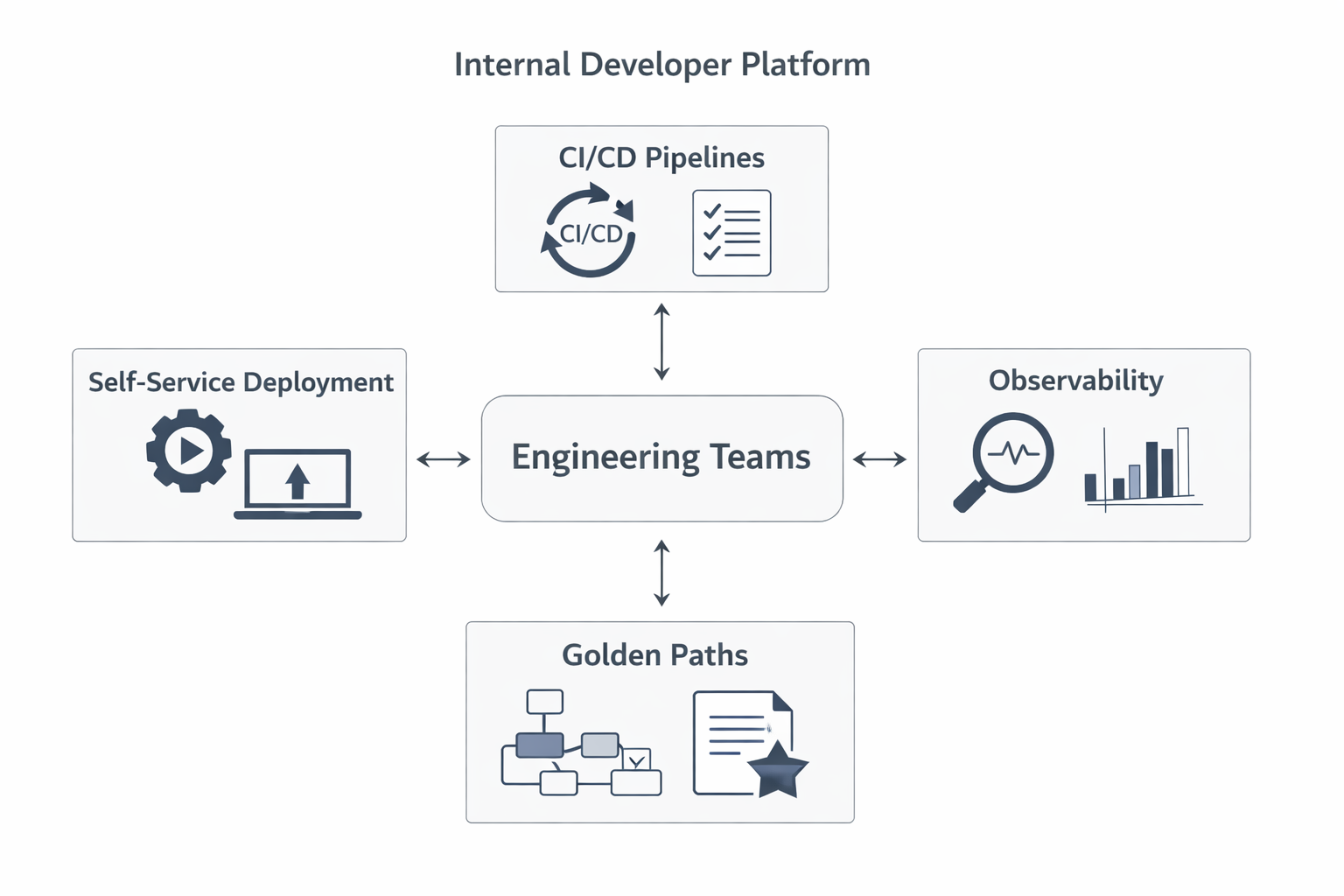
That matters because platform engineering changes how organizations think about architecture. Instead of forcing every application team to solve the same deployment, security, and environment problems repeatedly, the platform becomes a shared product. It offers paved roads: standard environments, templates, service catalogs, guardrails, and automation that remove common barriers to shipping software. Google Cloud’s platform engineering material describes this as a shift in mindset and collaboration, not merely a tooling change. (cloud.google.com)
The 2026 trendline is also shaped by AI. DORA’s 2025 research argues that AI is an amplifier: teams with strong foundations get more value, while teams with weak foundations see less benefit. Google Cloud highlights that platforms are crucial for scaling success because they convert isolated productivity gains into organizational improvements. The message is clear: if your internal platform is good, AI tools can accelerate delivery. If your platform is fragmented, AI just speeds up the chaos. (cloud.google.com)
This is why internal tool architecture has become a strategic discipline. The organization that invests in platform quality is not simply improving developer ergonomics; it is creating the conditions under which automation, AI, and fast iteration can compound.
3. Core architecture priority for internal tools
Internal tools should be designed around speed of iteration, self-service, reduced cognitive load, and minimal dependency on central teams. Those priorities sound mundane, but they determine whether teams move quickly or spend their time waiting on approvals, tickets, and tribal knowledge.
A good internal tool removes obstacles from a workflow. For example, instead of requiring a developer to ask an operations team to provision a resource, the tool should let them request it safely through a guided interface or API. Instead of expecting people to memorize policy details, the tool should encode the policy in the workflow. Instead of making every team solve deployment, logging, or access control independently, the platform should provide a standard path that works most of the time.
This architecture favors consistency over cleverness. The goal is to make the common path easy and safe. That usually means:
strong defaults,
opinionated templates,
self-service provisioning,
reusable modules,
minimal configuration surface,
and automation that handles repetitive steps.
The most useful internal systems are often boring in the best possible way. They are understandable, predictable, and easy to extend. Their success is measured not by market share but by how many handoffs they eliminate and how much cognitive load they remove from the people using them. Google Cloud’s platform engineering guidance emphasizes that efficient, automated workflows help teams adapt quickly and launch services faster, which is exactly the kind of leverage internal tools should create. (cloud.google.com)
A practical rule: if a workflow is repeated often, high-stakes enough to need guardrails, and narrow enough to standardize, it is a strong candidate for internal-tool optimization. The architecture should then be built to make that workflow fast and difficult to misuse.
4. Core architecture priority for customer-facing products
Customer-facing products live or die on latency, availability, UX consistency, security, and graceful degradation under unpredictable demand. The user is external, the environment is noisy, and the expectations are higher.
Unlike internal tools, customer products cannot assume a controlled audience or a predictable usage pattern. Demand can spike because of marketing campaigns, news, seasonality, outages elsewhere on the internet, or viral behavior. Users may be on old devices, slow networks, or unfamiliar browsers. They will also compare your product against the best consumer-grade experiences they know. That means the architecture must be built to absorb unpredictability without surprising the user.
Latency matters because users feel it immediately. Availability matters because downtime is visible and often public. UX consistency matters because customers interpret inconsistency as unreliability. Security matters because a public product is a target for abuse, scraping, fraud, and unauthorized access. Graceful degradation matters because when the full experience cannot be delivered, the product should still provide a useful partial one rather than failing completely.
Google Cloud’s reliability guidance explicitly recommends focusing on user-experience metrics such as query success ratio, application latency, and error rates. It also recommends following user journeys to find bottlenecks that degrade the experience. That is the right mental model for customer products: measure what the user feels, not just what the system is doing internally. (docs.cloud.google.com)
The architecture consequence is that customer-facing systems usually need stronger caching, load balancing, circuit breakers, retry logic, safe fallbacks, observability, abuse controls, and careful release strategies. A feature that works beautifully for a pilot group may still be unsuitable for launch if it cannot handle public traffic gracefully.
5. Reliability and observability differences
Reliability is not one thing. Internal tools and customer-facing products should not use the same reliability scorecard.
For internal tools, the most useful metrics often relate to operational success and throughput. Did the deployment complete? Was the access request approved? Did the support team resolve the case? Did the pipeline run successfully? These systems often matter because they help employees complete tasks, so the core question is whether the operation succeeded and how quickly the team moved through the workflow.
For customer-facing products, reliability has to be measured through the lens of the user experience. Google Cloud’s architecture guidance says to measure metrics like user query success ratio, application latency, and error rates. That recommendation is important because a system can look healthy internally while real users are still struggling. (docs.cloud.google.com)
A customer product can have a technically “successful” backend request and still deliver a terrible experience if pages take too long to render, if an important UI action fails silently, or if some users see errors while the aggregate system-wide metric looks fine. That is why observability for customer products often needs:
end-to-end tracing,
frontend and browser telemetry,
per-journey success measurement,
segment-based error analysis,
and alerts tied to customer impact.
Internal tools usually need less sophisticated public-facing telemetry, but they still benefit from workflow-level visibility. The difference is that internal observability is often tuned to help operators and maintainers move faster, while customer-product observability must also prove that the product is meeting user expectations at scale.
In short: internal tools ask, “Did the work get done?” Customer products ask, “Did the user have a good experience doing it?”
6. Data, permissions, and security
Security design is one of the clearest places where internal tools and customer products diverge.
Internal tools usually need tighter role-based access control and better auditability because the risk is often misuse by insiders rather than public abuse. Employees may need access to production data, configuration consoles, or admin workflows, but that access should be narrow, logged, and reviewable. In this world, the main concern is usually preventing accidental overreach, maintaining accountability, and preserving the integrity of operational actions.
Customer-facing products need a different emphasis: multi-tenant isolation, abuse prevention, and privacy-by-design. Public products must assume that some users will be malicious, some will be careless, and some will be operating at a scale that stresses the system in unexpected ways. Google Cloud’s security documentation repeatedly highlights logical isolation and multi-tenant design as core principles in shared cloud environments. (docs.cloud.google.com)
This means customer products often need:
strong tenant boundaries,
explicit data segregation,
encrypted storage and transport,
authorization checks at every sensitive boundary,
rate limiting,
bot and abuse detection,
and careful privacy controls.
A useful way to think about it: internal tools usually protect actions; customer products must protect people and data at population scale. Internal systems can often rely on known identities and controlled usage. External products have to defend against unknown behavior, untrusted input, and adversarial traffic.
Privacy-by-design is especially important for customer products because the product itself becomes the trust surface. Users need confidence that their data is handled appropriately even when the system is under stress, evolving quickly, or integrating with third-party services.
7. Scalability and cost tradeoffs
Scalability is not always about raw volume. It is about matching architecture to demand shape.
Internal tools often serve a narrower user base with more predictable usage patterns. That gives teams more room to optimize for developer productivity and simplicity rather than extreme elasticity. You can make pragmatic tradeoffs, such as accepting moderate batch-processing delays, using smaller clusters, or centralizing a few expensive capabilities because the number of users is known and the workflow is controlled.
Customer-facing products must tolerate much less predictability. Demand may spike quickly and unevenly. Seasonal traffic, promotions, integrations, and external events can all create load patterns that are hard to forecast. The system must scale elastically while keeping the experience stable. That often means paying more attention to autoscaling, caching, queueing, backpressure, and cost-to-serve.
Google Cloud’s multi-tenant documentation reflects the importance of cost efficiency and tenant management in architectures that must support many users and workloads safely. At the same time, its reliability guidance shows that the user experience should remain the priority even when internal infrastructure is complex. (docs.cloud.google.com)
There is also a business difference. Internal tools are justified by productivity gains, reduced toil, and faster delivery. Customer products are judged by revenue, retention, margin, and brand impact. That means the cost conversation is different too. For internal tools, “cheaper to operate” is good, but “less work for the team” may be even more important. For customer products, infrastructure cost is tied directly to business model pressure, so cost-to-serve can become a strategic concern.
The practical rule is this: internal tools should optimize for sufficient scale and low friction; customer products should optimize for elastic scale and efficient experience delivery.
8. Product management and UX differences
Internal tools are still products, but they are products with a different customer. The “customer” is your own team: developers, operations staff, analysts, support agents, or other internal users. That means the product management approach should still include a roadmap, feedback loops, and clear ownership — but the success criteria are different.
For internal tools, the best product managers focus on workflow pain, adoption friction, and time saved. They sit close to users, observe repeated tasks, and prioritize features that reduce interruptions. Good internal product thinking asks questions like:
Which steps are most frustrating?
Where do people leave the workflow?
What do users keep asking central teams to do for them?
Which repetitive tasks can be automated?
This is not traditional market-driven discovery. It is organizational efficiency discovery.
Customer-facing products require a much more market-driven approach. Discovery is shaped by competition, user acquisition, retention, conversion, and revenue. UX must be designed for clarity, trust, and delight because the user can leave with a click. Product teams need stronger experimentation, segmentation, onboarding design, and lifecycle thinking.
The interface expectations also differ. Internal tools can often assume users are trained or at least context-aware. Customer products cannot. They need better information architecture, clearer language, more forgiving flows, and more polished error handling. A confusing but powerful internal tool may be acceptable. A confusing public product is usually a liability.
The biggest UX mistake is to make a customer product feel like an internal admin panel. The biggest internal-tool mistake is to over-invest in polish at the expense of workflow speed and operational leverage.
9. AI and automation implications

AI changes both categories, but it helps them in different ways.
For internal tools, AI is most valuable when teams already have clear workflows, fast feedback loops, and good internal platforms. Google Cloud’s 2025 DORA research says AI is an amplifier, not a fix, and that the strongest gains come from solid foundations. It also reports that high-quality internal platforms are crucial for scaling success and unlocking AI’s value across the organization. (cloud.google.com)
That means AI can be especially powerful in internal settings where it helps with:
code assistance,
documentation generation,
ticket triage,
workflow automation,
incident support,
and self-service enablement.
But the benefits depend on structure. If workflows are unclear or platform quality is low, AI may produce faster output without better outcomes. Google Cloud’s DORA material also notes that teams with loosely coupled architectures and fast feedback loops tend to see gains, while tightly coupled systems and slow processes do not. (cloud.google.com)
For customer-facing products, AI can improve personalization, support, search, recommendations, and content generation. But the architecture must be even more careful because AI introduces trust, safety, and explainability concerns. If an internal AI workflow is wrong, the cost may be local inefficiency. If a customer-facing AI feature is wrong, the cost may be lost trust, compliance risk, or direct harm to users.
So the AI implication is not “add AI everywhere.” It is “use AI where the surrounding system is mature enough to absorb it.” Internal platforms often reach that threshold sooner because they are built around clear workflows and controlled environments.
10. A decision framework for choosing architecture priorities
The simplest way to decide architecture priorities is to ask four questions:
1) Who is the primary audience?
If the audience is internal, optimize for efficiency, self-service, and low coordination cost. If the audience is external, optimize for trust, consistency, and resilience under messy real-world usage.
2) Which workflows are critical?
If a workflow is repetitive and operationally important, internal tools should make it fast and safe. If the workflow is customer-visible and tied to satisfaction, conversion, or retention, the architecture should prioritize experience and reliability.
3) What is the business impact of failure?
For internal tools, failure often means delay, toil, or inconsistency. For customer products, failure can mean revenue loss, churn, reputational damage, or a security incident. The higher the external impact, the more you should invest in robustness and observability.
4) How tolerant is the system to failure?
Internal systems often tolerate partial degradation better because the organization can sometimes work around them temporarily. Customer products generally tolerate less because users expect the system to work now, without explanation. That means customer products need stronger graceful degradation and safer rollback paths.
A practical matrix helps:
Internal tool, low business impact, known users: optimize for speed, simplicity, and automation.
Internal tool, high business impact, many dependencies: add more governance, auditability, and observability.
Customer product, low traffic but visible brand impact: focus on UX quality, trust, and clean failure handling.
Customer product, high traffic and revenue critical: prioritize performance, availability, security, and abuse resistance.
The key is not to make every system enterprise-grade in every dimension. The key is to place your investment where the audience, risk, and business model demand it.
Conclusion
Internal tools and customer-facing products may share code patterns, cloud services, and engineering talent, but they should not share the same architecture priorities by default. Internal tools are fundamentally about reducing friction for the people who build and operate the business. Customer-facing products are about earning and preserving trust from people outside the organization.
As platform engineering becomes mainstream, the internal side of the house matters more than ever. Google Cloud’s 2025 DORA research suggests that most organizations now have at least one platform, and that platform quality is closely tied to AI value. That makes internal architecture a strategic advantage, not just an operational convenience. (cloud.google.com)
At the same time, customer products face a harsher environment: unpredictable traffic, public scrutiny, security threats, and user expectations that are unforgiving. Their architecture must therefore emphasize latency, availability, graceful degradation, privacy, and user-experience metrics.
The best teams do not ask, “What is the best architecture?” They ask, “Best for whom, and best for what failure mode?” Once you answer that honestly, the right priorities usually become much clearer.