
How to Use Terraform with Multiple Environments: Best Practices for 2026
July 21, 2026
Terraform is one of the most effective tools for managing infrastructure as code, but it becomes much more powerful—and much more dangerous—when teams use it across multiple environments. In real organizations, you rarely have just one infrastructure footprint. You typically have development, QA, staging, and production, each with different risk levels, credentials, data sensitivity, and deployment expectations. Terraform can manage all of that cleanly, but only if the structure is deliberate.
The core challenge is consistency without coupling. You want dev, staging, QA, and prod to share the same patterns and modules so they stay aligned, but you also want hard separation so a bad variable, a mistaken apply, or a shared state file does not cause cross-environment damage. HashiCorp’s own guidance increasingly points teams toward smaller, better-separated configurations, stronger workspace boundaries, and reusable modules rather than monolithic setups. (developer.hashicorp.com)
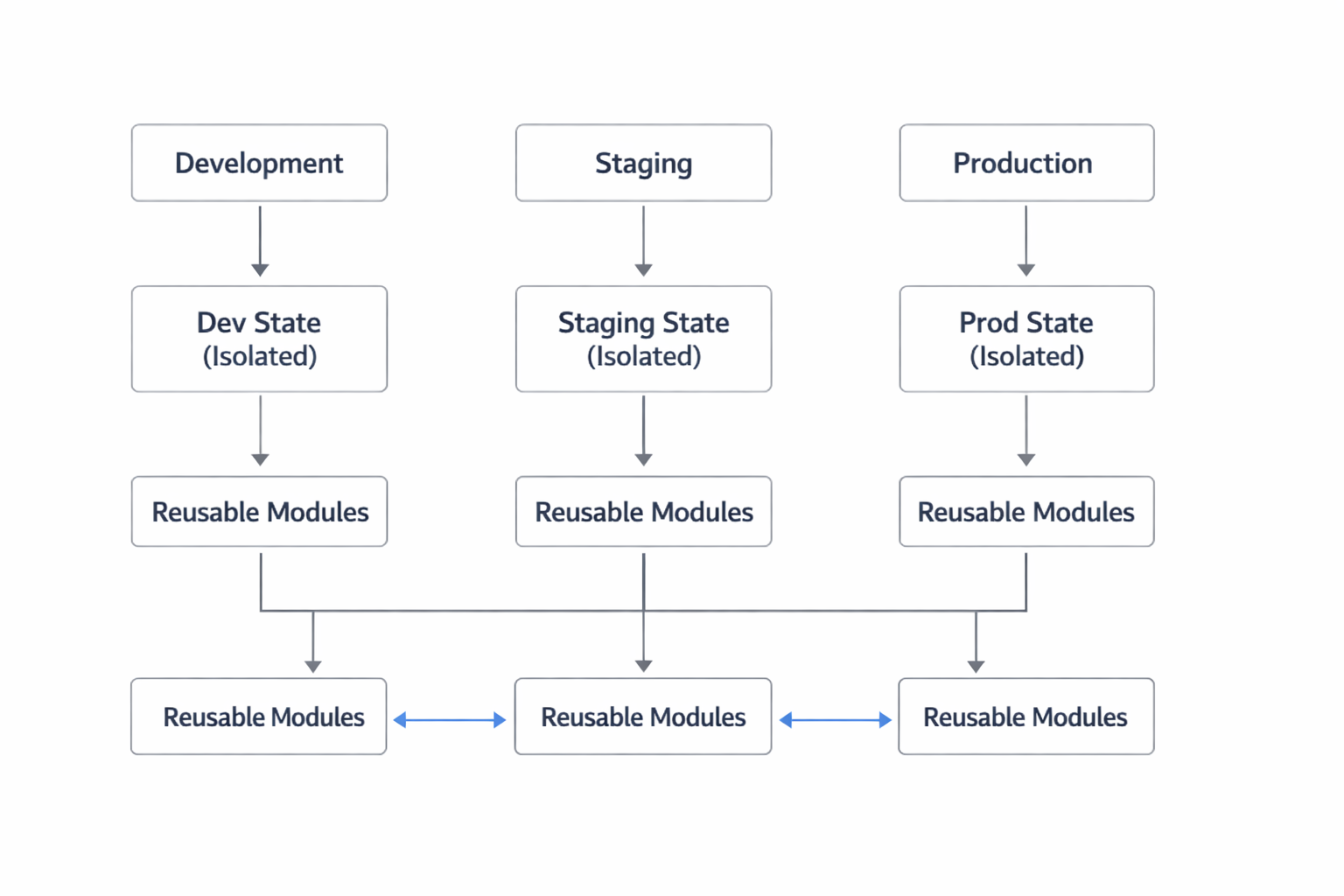
In this guide, we’ll break down the best-practice approach for 2026: how to think about environments, how to choose a separation model, when to use Terraform CLI workspaces versus HCP Terraform workspaces, and how to design a safer architecture with isolated state, environment-specific variables, controlled promotion, and governance that scales. The goal is simple: make infrastructure changes repeatable, auditable, and hard to misuse. (developer.hashicorp.com)
1. Why multi-environment Terraform matters and the most common pitfalls
Multi-environment Terraform matters because most infrastructure changes are not isolated to a single lifecycle stage. A VPC pattern tested in development often becomes the blueprint for staging and production. A module that provisions an app service, database, IAM permissions, and monitoring usually needs to exist in several versions of the same stack. Without a proper environment strategy, teams tend to drift into copy-pasted directories, shared state, or manual changes that break the benefits of Terraform in the first place. Terraform’s module model is specifically designed to help you codify repeated patterns, while state exists to map configuration to real-world resources. (developer.hashicorp.com)
The biggest pitfall is assuming “separate variables” means “separate environments.” If dev and prod share state, or if one environment can accidentally read another’s credentials, you have not actually isolated risk. Another common mistake is treating workspaces like an environment manager without understanding what kind of workspace is being used. Terraform CLI workspaces are just multiple state instances inside the same working directory, while HCP Terraform workspaces are full organizational units with their own config, variables, state, and access controls. Those are not interchangeable concepts. (developer.hashicorp.com)
A third pitfall is overusing copy-paste. Teams sometimes create dev/, qa/, staging/, and prod/ directories and then duplicate nearly identical code in each. That works briefly, but it quickly becomes unmaintainable. The better approach is to centralize the reusable logic in one module and keep only environment-specific root configurations thin and explicit. HashiCorp recommends reusable modules for repeated infrastructure patterns and smaller configurations for easier governance and delegation. (developer.hashicorp.com)
2. What “multiple environments” means in Terraform: dev, staging, QA, prod
In Terraform, “multiple environments” usually means multiple independent sets of infrastructure that follow the same design but serve different purposes. Development environments are for rapid iteration and experimentation. QA environments verify application behavior and automated tests. Staging mirrors production as closely as possible so you can validate release readiness. Production is the live system serving users. Each environment may use the same module code, but each should have its own state, variables, credentials, and access rules. (developer.hashicorp.com)
The important idea is that environments are not just labels. They represent different levels of risk and control. For example, dev can tolerate more frequent changes, smaller instance sizes, shorter retention settings, and looser restrictions. Staging and QA should look closer to prod in architecture but usually use synthetic or scrubbed data. Prod should have the strictest permissions, the most guarded secrets, and the most formal deployment workflow. In Terraform terms, this means environment separation should show up in state, root configuration, variable sets, and permissions—not just in a string like env = "prod". (developer.hashicorp.com)
A practical way to think about it is that each environment is a separate “contract” with the same blueprint but different inputs. The module defines the blueprint. The environment root defines the inputs. The state records what exists. The workspace or backend isolates where that state lives. This separation gives you reproducibility while allowing each environment to evolve safely at its own pace. Terraform’s documented model of configuration, variables, and state aligns naturally with this approach. (developer.hashicorp.com)
3. Choosing the right separation model: directories, workspaces, modules, or separate stacks
There is no single “one true” structure for all Terraform projects, but there are clear tradeoffs. The main separation models are directories, workspaces, modules, and separate stacks or projects. In practice, the best design for most teams is a combination: use modules for shared logic, separate environment root directories for environment-specific wiring, and separate state for each environment. HashiCorp’s current HCP Terraform guidance also emphasizes smaller configurations and delegated responsibility over monolithic setups. (developer.hashicorp.com)
Directories are the simplest and most readable option. You might have envs/dev, envs/staging, and envs/prod, each with its own root module. This gives you a clean place to store environment-specific variables, provider config, and backend settings. The downside is duplication if you put too much logic in those roots. Used correctly, directories are a strong fit for separate environments because they make isolation visible in the repository structure. (developer.hashicorp.com)
Modules are not an environment separation model by themselves; they are a reuse mechanism. A module should define what a component does—such as a database, app cluster, or networking stack—while the environment root decides where and how to deploy it. If you try to use modules as if they were environments, you can lose clarity about ownership and state boundaries. HashiCorp describes modules as collections of resources managed together, and recommends them for repeatedly provisioned patterns. (developer.hashicorp.com)
Terraform CLI workspaces can be useful in narrow cases, especially for keeping multiple state files in one working directory. But HashiCorp explicitly notes that they are different from HCP Terraform workspaces and recommends alternative approaches for complex deployments requiring separate credentials and access controls. That makes CLI workspaces a weaker fit for serious multi-environment separation in most teams. (developer.hashicorp.com)
Separate stacks or projects are the most scalable option when environments and components need independent permissions, lifecycle, or state. HCP Terraform now organizes infrastructure into projects containing workspaces and stacks-based organizational models, and its guidance favors breaking large configurations into smaller ones with delegated permissions. If your organization has multiple teams, separate blast radiuses, or different approval requirements, separate stacks or workspaces are usually the safer path. (developer.hashicorp.com)
4. Terraform CLI workspaces vs. HCP Terraform workspaces: key differences and when to use each
This is one of the most important distinctions in Terraform, and it is easy to misunderstand. Terraform CLI workspaces are a feature of the CLI itself. They create separate state instances within the same working directory. That means one configuration can manage multiple state files, but it does not create separate codebases, separate permissions, or separate infrastructure ownership by itself. Every initialized working directory starts with a default workspace, and CLI workspace commands like terraform workspace new and terraform workspace list manage the options inside that directory. (developer.hashicorp.com)
HCP Terraform workspaces are a different concept. In HCP Terraform, a workspace is a management boundary that contains configuration, variables, state, and execution settings. HCP Terraform uses workspaces as a core part of its organizational model and access control system, and you cannot manage resources there without creating at least one workspace. Workspaces also support run history, state history, and workspace-level permissions. (developer.hashicorp.com)
The key practical difference is intent. CLI workspaces are primarily about multiple state instances for a single working directory. HCP Terraform workspaces are about team workflow, governance, and separation of concern. HashiCorp states that CLI workspaces are not ideal for complex deployments requiring separate credentials and access controls, while HCP Terraform workspaces are designed for exactly that kind of separation. (developer.hashicorp.com)
Use Terraform CLI workspaces only when you truly want multiple states for one small configuration and your access-control needs are minimal. Use HCP Terraform workspaces when you want remote execution, team permissions, policy enforcement, run history, and clean division between environments or components. If you are designing for 2026 best practices, HCP Terraform workspaces are generally the stronger choice for production-grade multi-environment operations. (developer.hashicorp.com)
5. Recommended architecture: one reusable module, separate environment roots, separate state
The most robust pattern for multi-environment Terraform is straightforward: build one reusable module, create separate environment roots, and keep separate state for each environment. This keeps your business logic centralized while preventing accidental overlap in resource ownership. HashiCorp’s module guidance supports reusable modules for repeated provisioning, and its workspace guidance supports separate boundaries with their own state and variables. (developer.hashicorp.com)
A practical repository structure might look like this:
infra/
  modules/
    app/
    network/
    database/
  envs/
    dev/
    qa/
    staging/
    prod/
Each folder under envs/ contains a thin root configuration that points to the shared module and passes environment-specific values. The module handles the resource definitions, while the root determines provider settings, backend configuration, input variables, and naming conventions. This gives you one source of truth for infrastructure logic while still allowing each environment to evolve independently. (developer.hashicorp.com)

Separate state is non-negotiable in this model. Terraform state is how Terraform maps configuration to real-world resources, so if two environments share state, Terraform can no longer safely distinguish them. That opens the door to destructive confusion, especially when resources have similar names. Separate state also makes drift management, rollback, and troubleshooting much easier. (developer.hashicorp.com)
The ideal architecture also keeps each environment root small enough that it is readable at a glance. If a root file starts to contain long lists of resources, business logic, or repeated patterns, that is a sign the module boundary is too thin or the environment layer is doing too much. The right split is usually: module = reusable implementation, root = environment-specific composition, state = environment-specific history. (developer.hashicorp.com)
6. State isolation and naming conventions: preventing accidental cross-environment changes
State isolation is one of the strongest defenses against cross-environment mistakes. Terraform state is the record of what Terraform manages, and without clear isolation, a single apply can touch the wrong infrastructure. The safest pattern is one state file per environment, with each environment bound to a separate backend key, workspace, or HCP Terraform workspace. HashiCorp’s documentation emphasizes that state is central to resource tracking and that HCP Terraform workspaces keep state separately from other workspaces. (developer.hashicorp.com)
Naming conventions matter almost as much as state boundaries. If resource names are too generic, it becomes harder for humans to spot a mistake before it becomes an incident. A good convention usually includes the environment, region, service, and possibly the team or business unit. For example: payments-prod-us-east-1 or network-staging-eu-central-1. HCP Terraform’s workspace creation guidance specifically recommends descriptive naming and suggests names that may include environment and region information. (developer.hashicorp.com)
You should also align backend naming with workspace naming. For example, if you use remote state storage, name keys or paths so they are impossible to confuse: app/dev/terraform.tfstate, app/staging/terraform.tfstate, and app/prod/terraform.tfstate. The goal is to make the separation obvious in both the code and the backend. A strong naming system becomes a safety mechanism, because it helps humans and automation detect mismatches early. (developer.hashicorp.com)
Finally, be careful with shared dependencies. If staging consumes outputs from a network stack, don’t give it broad access to prod state unless you have a strong reason and a tightly controlled approval path. HCP Terraform allows control over which workspaces can access another workspace’s state, which is exactly the kind of guardrail multi-environment systems need. (developer.hashicorp.com)
7. Managing variables, secrets, and provider credentials per environment
Variables should describe differences, not hide architecture. Environment-specific values belong in environment-specific variables, variable sets, or .tfvars files, depending on your workflow. HCP Terraform supports workspace variables and sensitive variables, and HashiCorp’s docs note that sensitive input variables are write-only in the UI and not readable through the Variables API endpoint. That is useful for secrets, but it does not replace good secret handling practices. (developer.hashicorp.com)
A strong pattern is to keep defaults in code only when they are truly safe and universal, then define environment-specific values in the environment root or workspace. For example, instance size, desired replica count, allowed CIDR ranges, and DNS names are often environment-specific. The less a root module needs to guess, the safer and more readable it becomes. HashiCorp also recommends marking sensitive values directly in variable and output declarations whenever possible. (developer.hashicorp.com)
Provider credentials should be isolated per environment too. A dev workspace should generally not be able to assume the same cloud role as prod unless that is absolutely required and strongly controlled. HCP Terraform workspaces are designed to store credentials and secrets as sensitive variables, and they support permissions at the workspace level. That makes them a natural place to separate access by environment or even by team. (developer.hashicorp.com)
The main principle is least privilege. Dev should have only the permissions it needs to create and destroy non-production resources. Staging should be somewhat stricter. Prod should be the most protected environment, with dedicated credentials, approval gates, and minimal human access. If a person or CI job can deploy to prod, it should be because that access was explicitly granted—not because prod shares the same environment variables as everything else. (developer.hashicorp.com)
8. Promotion workflows: testing in dev, validating in staging, deploying to prod
Promotion is the process of moving a known-good change from one environment to the next in a controlled sequence. In Terraform workflows, that often means validate in dev, confirm in staging or QA, and then promote to production with stronger approval and monitoring. This mirrors software release practices and works especially well when each environment has its own root and state. (developer.hashicorp.com)
The key to effective promotion is consistency. You should not be editing the same Terraform code differently for each environment unless there is a specific reason. Instead, promote the same module version or the same Git commit through all environments, changing only the environment-specific inputs. That lets you test the same architecture under different conditions and reduces “works in staging, fails in prod” surprises. HashiCorp’s focus on reusable modules and separate workspaces supports this kind of controlled consistency. (developer.hashicorp.com)
A good workflow might look like this:
Merge a change into the main branch.
Run dev plan/apply automatically.
Validate the change in QA or staging with tests and smoke checks.
Require manual approval before prod apply.
Use run history and audit trails to trace what changed and who approved it. HCP Terraform retains run history and supports remote operations and workspace-based governance, making this process easier to audit. (developer.hashicorp.com)
Promotion should also include drift awareness. If staging or prod has been modified outside Terraform, a normal promotion can fail or behave unexpectedly. HCP Terraform’s health assessments can help detect drift and configuration mismatches in supported editions, which gives teams a stronger signal before they promote changes onward. (developer.hashicorp.com)
9. Governance, access control, and team ownership for safer environment separation
Governance is where good Terraform designs become operationally safe. Without clear ownership and permissions, environment separation can still fail if too many people can edit too much infrastructure. HCP Terraform workspaces are explicitly tied to role-based access control, and permissions can be granted per workspace or per project. That makes them a good fit for organizations that want dev, staging, and prod managed by different teams or with different approval rules. (developer.hashicorp.com)
A mature ownership model usually looks something like this: one platform team owns shared modules, individual application teams own their environment roots, and production deployments require additional approval or restricted permissions. HCP Terraform’s documentation encourages breaking monolithic configurations into smaller components and delegating responsibilities across workspaces, which aligns well with this model. (developer.hashicorp.com)
Team ownership should also map to environment risk. For example, the same engineer may be allowed to work freely in dev but only submit plans or requests in prod. That reduces the chance of accidental production changes while still keeping delivery fast. Workspace permissions, sensitive variables, and state access settings all support this kind of separation. (developer.hashicorp.com)
Governance is also about proving what happened after the fact. Run histories, state versions, and auditability matter in incident response, compliance, and postmortems. HCP Terraform retains both run history and previous state versions, which helps teams understand how an environment got to its current state. In other words, governance is not just about prevention; it is also about recoverability and accountability. (developer.hashicorp.com)
10. Common mistakes, anti-patterns, and a practical checklist for implementation
The most common Terraform multi-environment mistakes are surprisingly consistent. The first is using one state for everything. The second is copying entire configurations into multiple directories and letting them drift apart. The third is confusing Terraform CLI workspaces with HCP Terraform workspaces. The fourth is sharing credentials across environments. The fifth is allowing environment-specific differences to leak into module logic instead of keeping them at the root layer. Each of these makes the system harder to understand and more dangerous to change. (developer.hashicorp.com)
Another anti-pattern is overloading a module with environment rules. A module should usually not contain logic like “if env is prod, do X, otherwise do Y” unless the difference is truly intrinsic to the resource itself. The clearer pattern is for the root configuration to decide which values to pass in. Likewise, avoid relying on local shell state or ad hoc environment variables to represent important production inputs; put those values into versioned, reviewable configuration instead. (developer.hashicorp.com)
Here is a practical checklist for implementation:
Create one reusable module for each repeating infrastructure component.
Make separate root directories or stacks for dev, QA, staging, and prod.
Give each environment its own state.
Use clear naming that includes environment and purpose.
Store environment-specific values outside the shared module.
Mark secrets as sensitive and restrict who can view them.
Use separate provider credentials or roles per environment.
Add promotion gates between staging and production.
Give teams scoped access to the environments they own.
Prefer smaller, delegated workspaces or stacks over monoliths. (developer.hashicorp.com)
Conclusion
Using Terraform across multiple environments is not just about organizing code; it is about reducing operational risk. The safest 2026 pattern is still the clearest one: one reusable module, separate environment roots, separate state, and environment-specific credentials and approvals. That structure gives you consistency where you want it and isolation where you need it. (developer.hashicorp.com)
The biggest takeaway is that environments should be treated as separate contracts, not just different variable files. Use Terraform CLI workspaces carefully and sparingly, because they are only state partitions inside one directory. For most production teams, HCP Terraform workspaces, smaller delegated configurations, and explicit permissions provide a safer and more scalable model. (developer.hashicorp.com)
If you implement the checklist above, you will have a Terraform setup that is easier to audit, safer to operate, and much less likely to suffer accidental cross-environment changes. That is the real value of a good multi-environment design: not just cleaner code, but fewer surprises. (developer.hashicorp.com)