
How to Deploy a Modern Web App with Docker and Docker Compose: A 2026 Guide
May 12, 2026
Deploying a modern web app in 2026 does not automatically mean jumping straight to Kubernetes. For many teams, Docker and Docker Compose still offer a practical path from local development to production: they are portable, easy to reason about, and well-suited to the common “web app + API + database + cache” pattern. Docker’s own Compose documentation describes Compose as the way to define and run multi-container applications, with services, networks, volumes, secrets, and configs all described in a single app model. (docs.docker.com)
That matters because most web applications do not begin as hyperscale platforms. They usually start as one frontend, one backend, a database, maybe Redis, and a handful of supporting services. Compose gives you a clean way to package those parts, keep them isolated, and deploy them consistently. It is also the right size of tool for many single-server or small-cluster production environments, especially when you want predictable deployments without adding an orchestration layer you do not yet need. Compose’s current CLI conventions also fit this mindset: docker compose is the modern command family, and docker compose config can render the final resolved configuration for inspection. (docs.docker.com)
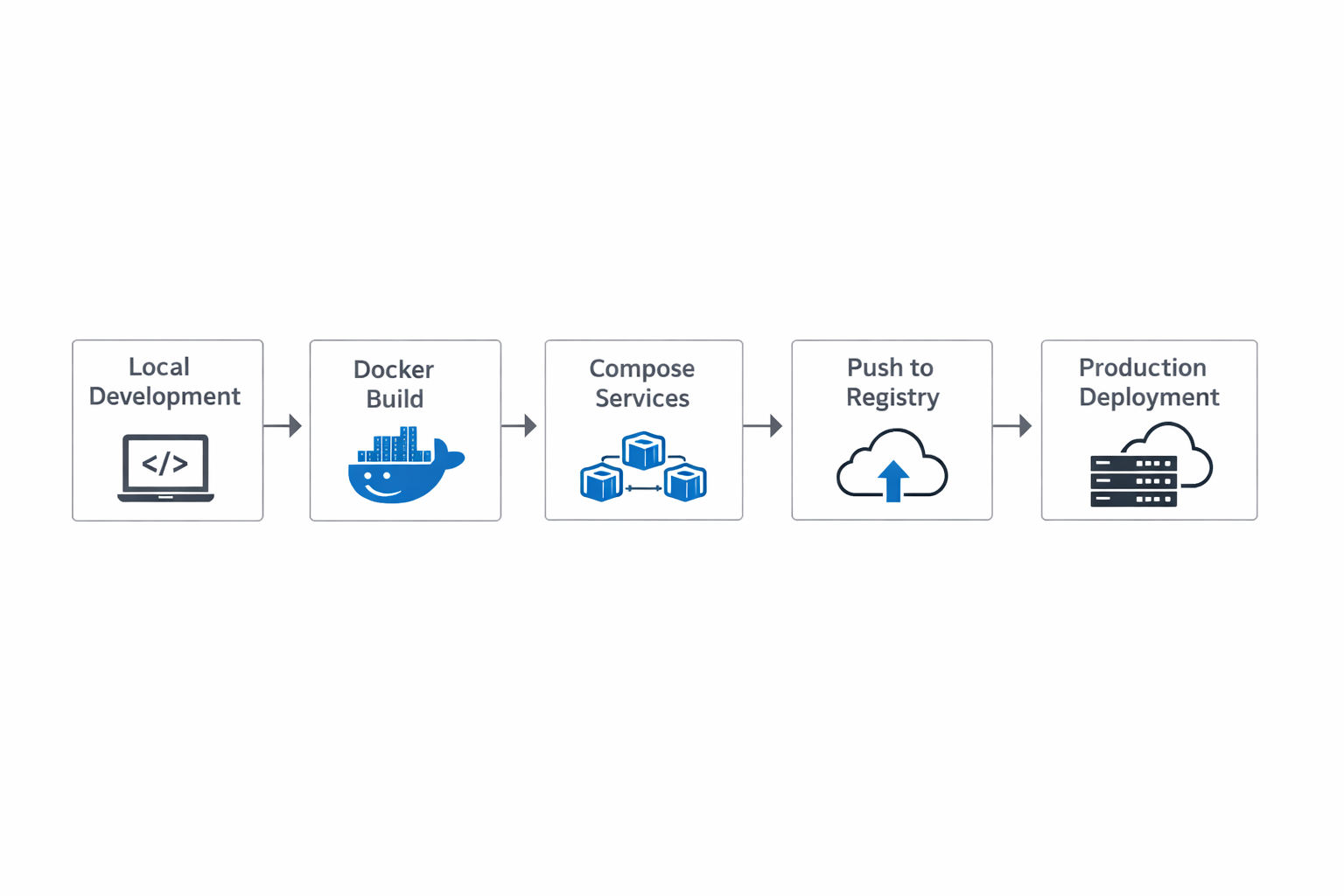
1. Why Docker and Compose still make sense for modern web apps
Docker and Compose remain practical in 2026 because they solve a very old problem in a very direct way: “It works on my machine” should not be a deployment strategy. Containers package the app with the runtime expectations it needs, and Compose lets you coordinate the services that make up the application stack. Docker’s Compose application model is explicitly built around starting and managing multiple services from one configuration, which makes it a good fit for web apps that are composed of several moving parts rather than one monolith. (docs.docker.com)
The main advantage is operational simplicity. A Compose file can define your frontend, backend, database, cache, and background workers together, while still keeping each service isolated. That makes local development, testing, and production deployment look much more similar than they would with ad hoc scripts or manual server setup. It also makes the deployment artifact readable: instead of reverse-engineering shell scripts and system packages, you can inspect a single Compose definition and understand how the app is assembled. Docker’s Compose reference says the format is the latest recommended file format, and it directly covers services, networks, volumes, configs, and secrets. (docs.docker.com)
Compose is also a strong choice when you want one server to host several app components without turning your deployment into infrastructure theater. A lot of teams do not need distributed schedulers, autoscaling controllers, or a large platform team to ship a reliable application. They need repeatability, sensible isolation, and easy rollouts. Compose gives you exactly that, and the current CLI conventions—such as project naming, up, down, logs, and config—make the tool approachable for both developers and operators. (docs.docker.com)
2. What Docker Compose is in 2026
In 2026, the Compose Specification is the center of gravity. Docker’s docs say the Compose Specification is the latest and recommended version of the Compose file format, and that the older 2.x and 3.x file formats were merged into it. In practice, that means you should think in terms of the Compose Specification rather than outdated “versioned YAML” folklore. The top-level structure focuses on services, networks, volumes, configs, and secrets, with the Compose CLI interpreting and running that application model. (docs.docker.com)
The multi-container app model is the key idea. Instead of treating the container as the unit of the whole system, Compose treats each service as a separately defined component. A service might be your React or Next.js frontend, another service might be a Python, Node, Go, or Java API, and others may be infrastructure dependencies such as Postgres, Redis, or a worker queue. Docker’s application model documentation says the project name groups resources together and isolates one installation from another, which is especially useful when you run multiple environments or feature branches on the same host. (docs.docker.com)
Current CLI conventions are straightforward: the modern command is docker compose, not the old standalone docker-compose binary. Docker’s CLI reference includes commands like docker compose config, docker compose logs, docker compose restart, and docker compose up. You can also set or override the project name with -p or via the top-level name: attribute. That matters because the project name is what scopes resource names, avoids collisions, and makes cleanup much safer. (docs.docker.com)
3. Designing the app architecture
A good Compose deployment starts with a clear service map. For a modern web app, the usual pieces are: a frontend that handles presentation, a backend API that implements business logic, a database for durable storage, a cache for low-latency reads or session data, and possibly supporting services such as a worker queue, message broker, object storage gateway, or reverse proxy. Compose is designed to express exactly that kind of multi-service stack. (docs.docker.com)
The first design decision is whether your frontend and backend are deployed as separate services or bundled together. In 2026, it is common to split them when the frontend is a separate build artifact or when the frontend needs to scale independently. The backend then exposes an internal API over the Compose network, while a reverse proxy or edge service handles public traffic. This split gives you cleaner deployments, but it also means you need to think carefully about service discovery, health checks, and startup order. Compose services can reference each other by service name on the project network, which is one of the reasons it works well for local and single-host production setups. (docs.docker.com)
Next, decide which services are stateless and which are stateful. Stateless services—frontend, API, workers, proxies—can usually be recreated at any time if the image and config are correct. Stateful services—databases, queues, and file stores—need persistent volumes, backup plans, and more cautious rollout procedures. Docker’s volume documentation makes the persistence model explicit: named volumes are persistent data stores, and if multiple services need access you must grant that access intentionally. That separation is a healthy design constraint because it forces you to distinguish durable data from disposable runtime state. (docs.docker.com)

4. Writing production-ready Dockerfiles
Production-ready Dockerfiles should be small, predictable, and easy to rebuild. Docker’s official guidance recommends multi-stage builds, choosing the right base image, excluding irrelevant files with .dockerignore, and pinning base image versions. Multi-stage builds are particularly important because they let you compile, bundle, or optimize your app in one stage and copy only the needed runtime artifacts into the final image. That reduces image size, lowers attack surface, and removes build tools from production containers. (docs.docker.com)
A common production pattern is: a builder stage installs dependencies and produces artifacts; a runtime stage starts from a smaller base image and copies in only what is necessary. For example, a Node app might build static assets in one stage and run them in an Nginx or minimal Node runtime image in the final stage. A Python app might compile wheels in one stage and install only runtime dependencies in the next. Docker’s docs say multi-stage builds are recommended for all types of applications, and that the final image can be tiny because the compiler and intermediate artifacts are not carried forward. (docs.docker.com)
You should also use a .dockerignore file aggressively. This prevents your build context from sending secrets, local caches, tests, node_modules, build outputs, and editor junk into the image build. Docker’s best-practices documentation explicitly recommends .dockerignore to exclude irrelevant files. Finally, pin your base images rather than floating on latest. Docker’s best practices call out pinning base image versions, and this is one of the simplest ways to make builds reproducible and auditable. A pinned digest is even better when you want deterministic rebuilds. (docs.docker.com)
A practical example for a backend might look like this:
# syntax=docker/dockerfile:1

FROM node:22-alpine AS build
WORKDIR /app
COPY package*.json ./
RUN npm ci
COPY . .
RUN npm run build

FROM node:22-alpine
WORKDIR /app
ENV NODE_ENV=production
COPY --from=build /app/dist ./dist
COPY package*.json ./
RUN npm ci --omit=dev
USER node
CMD ["node", "dist/server.js"]
This is not just cleaner; it is more secure and easier to operate. It keeps the final container focused on runtime behavior rather than build-time assumptions. (docs.docker.com)
5. Building a Compose setup
A production-minded Compose file should define services, networks, volumes, and health checks explicitly. Docker’s services reference says a Compose file must declare a top-level services element, and the services can then be wired together with networks and mounted volumes. Named volumes are the right tool for durable storage, while networks keep internal communication predictable and isolated from the host. (docs.docker.com)
Health checks are worth the effort. Docker’s Compose service reference says service health checks behave like the HEALTHCHECK Dockerfile instruction, and they let Compose know when a container is actually ready rather than merely running. That distinction matters because “container started” is not the same as “application is accepting traffic.” A database may still be initializing, or your backend may still be performing migrations. Health checks give you a way to encode readiness into the deployment itself. (docs.docker.com)
Dependencies should be expressed carefully. In real deployments, depends_on is useful as a startup hint, but you should not rely on it alone as a readiness guarantee. Use health checks and application-level retry logic so services can survive slow startups or transient failures. That is especially important if the backend depends on the database or cache being available before it can serve traffic. Compose can describe the graph, but your app should still be resilient to real-world timing. (docs.docker.com)
Project naming also matters. Docker says the top-level name: attribute defines the project name if you do not set one explicitly, and the project name is used to group resources and isolate one installation from another. The CLI also supports -p / --project-name. In practice, that means you can deploy app-staging and app-prod on the same machine without resource collisions, as long as you manage names consistently. (docs.docker.com)
A concise production-style skeleton might look like this:
name: myapp

services:
  frontend:
    image: myapp-frontend:2026.05.12
    depends_on:
      backend:
        condition: service_healthy
    networks: [appnet]

  backend:
    image: myapp-backend:2026.05.12
    environment:
      DATABASE_URL: ${DATABASE_URL}
    healthcheck:
      test: ["CMD", "curl", "-f", "http://localhost:8080/health"]
      interval: 10s
      timeout: 3s
      retries: 5
    networks: [appnet]

  db:
    image: postgres:17
    volumes:
      - db-data:/var/lib/postgresql/data
    networks: [appnet]

networks:
  appnet:

volumes:
  db-data:
This is enough to express the application topology without overengineering it. (docs.docker.com)
6. Environment management and secrets
Environment management is one of the easiest places to create accidental drift, so it deserves structure. Docker Compose supports .env files and environment interpolation, and Docker’s docs spell out the precedence rules for variables when they are defined in multiple places. The highest-priority values come from docker compose run -e, then interpolated values from the shell or environment file, then environment, then env_file, and finally image-level ENV defaults. (docs.docker.com)
The practical takeaway is simple: keep configuration layered. Put defaults in the Compose file, use .env for non-secret environment-specific values, and avoid baking environment assumptions into the image. The image should describe the app; the Compose file should describe how the app is run; and the environment should provide deploy-time differences such as hostnames, ports, feature toggles, and API URLs. Docker’s environment-variable docs emphasize this interpolation and reuse model. (docs.docker.com)
Secrets should be handled separately from ordinary environment variables whenever possible. Docker’s Compose secrets reference exists specifically for sensitive data, and Compose allows secrets to be defined or referenced at the top level and granted only to the services that need them. That means passwords, tokens, and private keys should not live in image layers, hard-coded YAML, or casual .env files checked into version control. Instead, define a separation between config and secrets, and mount secrets only where needed. (docs.docker.com)
For development, staging, and production, the safest pattern is to keep three layers: base Compose for shared behavior, environment-specific override files, and separate environment/secret inputs for each deployment target. This keeps the service graph stable while allowing per-environment differences in URLs, resource limits, log verbosity, and credentials. It also makes audits easier, because secrets handling and ordinary config changes are not mixed together. (docs.docker.com)
7. Production deployment patterns
For many teams, the most practical production use of Compose is a single-server deployment: one host, one Docker engine, one Compose project, and a controlled release process. This is not “toy” architecture if the workload fits the model. Compose’s project scoping, service definitions, named volumes, and restart controls are all well suited to that environment. Docker’s restart documentation says containers can be configured to restart automatically when they exit or when Docker restarts, which is a core building block for small production systems. (docs.docker.com)
Override files are a very useful operational pattern. You might keep compose.yml for the shared baseline and compose.prod.yml for production-specific differences such as image tags, resource settings, logging, or secrets wiring. The docker compose CLI supports multiple -f files, and Docker documents docker compose config as a way to render the final canonical configuration. That makes it easier to review what will actually run before you deploy. (docs.docker.com)
Restart policies and redeploy behavior need to be deliberate. Docker’s restart policy docs distinguish between automatic restarts and manual docker compose restart, and Compose’s deploy specification includes restart_policy settings such as on-failure, delays, and max attempts. For production, the goal is not simply “restart forever”; it is to restart predictably and avoid endless crash loops. You also want graceful shutdown timeouts and health checks so a replaced container does not receive traffic before it is ready. (docs.docker.com)
Zero-downtime redeploys on a single host usually come from a pattern, not from magic. You build the new image, pull it onto the server, bring up the updated container, wait for health checks, and only then drain or remove the old container. If you are fronting the app with a reverse proxy, that proxy can continue to serve traffic while backend containers are rotated underneath it. Compose can support that workflow well, but your app must tolerate concurrent old and new versions during the transition. (docs.docker.com)
8. Security and reliability
Security starts with least privilege. Docker’s rootless mode documentation says it lets you run the Docker daemon and containers as a non-root user to mitigate potential vulnerabilities in the daemon and container runtime. Even if you do not use rootless mode everywhere, you should still run application processes as a non-root user inside the container whenever possible. That reduces the blast radius of container escapes and privilege mistakes. (docs.docker.com)
The same principle applies to images and dependencies. Use trusted base images, keep them minimal, and rebuild regularly. Docker’s best practices recommend official images when possible and minimizing unnecessary packages. Avoid packing debugging tools, build tools, and package managers into runtime images unless they are truly required. The smaller the image, the easier it is to inspect and the less there is to attack. (docs.docker.com)
Secret handling is another security boundary. Compose secrets are designed for sensitive values, and they are preferable to hard-coded environment variables for production credentials. Also remember that logs can leak secrets if your app prints environment variables, stack traces, or request payloads indiscriminately. Docker’s logging docs and Compose logging support make it easy to centralize logs, but you still need application-level redaction and sane defaults. (docs.docker.com)
Supply-chain hygiene is now a standard operational concern, not a niche topic. Docker Scout is positioned as a supply-chain security tool for image analysis and remediation guidance, which makes it useful for catching vulnerable dependencies and stale base images. Even if you use a different scanner, the workflow should be similar: scan images in CI, block known-bad releases, and rebuild when base layers receive security updates. (docs.docker.com)
9. Scaling and operational concerns
Compose is enough when the problem is simple: a single host, a small team, predictable traffic, and a limited service graph. It becomes less enough when you need multi-host scheduling, automatic rescheduling across failures, advanced rollout strategies, horizontal autoscaling, or deep platform integration. At that point, moving to Swarm or Kubernetes can make sense, but only after the operational complexity genuinely outweighs the simplicity benefits of Compose. Docker’s own docs keep Compose focused on the application model, while Swarm-style deployment features appear separately in the deploy specification. (docs.docker.com)
Persistent data deserves a backup story long before you need one. Docker named volumes are meant for durable state, but durable is not the same as backed up. Databases should be backed up using database-native tools or a proven snapshot process, and you should test restore procedures regularly. If your app stores uploads or user-generated files, decide whether the data lives in a volume, object storage, or an external service, and make the choice explicit. Docker’s volume docs make clear that volumes are shared data stores and must be attached intentionally to services. (docs.docker.com)
A useful operational rule is this: if your deployment needs coordination between many machines, frequent traffic shifting, or node-aware scheduling, Compose alone is probably no longer the right tool. If your deployment mainly needs repeatable service definition, predictable startup, and clean single-host operations, Compose is often exactly right. The key is matching the tool to the real operational shape of the app, not to a trend. (docs.docker.com)
10. Testing, observability, and CI/CD
Good production deployments begin in local testing. Compose is especially valuable here because the same service definitions can be used to bring up the app stack on a developer laptop, in CI, or on a server. Docker’s documentation for docker compose config helps validate and normalize the final result, while docker compose logs gives you a quick way to inspect what each service emitted during startup or failure. (docs.docker.com)
Observability should start with logs, but it should not end there. Container logs are easiest to use when they are structured and written to stdout/stderr rather than to files hidden inside the container filesystem. Docker’s logging docs explain how container logs are captured and how logging drivers affect access to them. In production, you should choose a logging strategy that supports rotation, retention, and external aggregation so logs do not fill disks or disappear when containers are recreated. (docs.docker.com)
CI/CD should build images, test them, scan them, and publish them in a repeatable sequence. A practical pipeline usually runs unit tests, builds the container image, executes smoke tests against the image or a Compose stack, scans for known vulnerabilities, and then pushes a versioned tag. Docker Scout is one option for image analysis and remediation, but the broader principle is more important than the tool: use automation to catch base-image drift and dependency issues before they reach production. (docs.docker.com)
Rollback planning is part of CI/CD, not an afterthought. If you tag images immutably and keep old releases available, rolling back can be as simple as redeploying the previous known-good image and configuration. That is one reason pinned base images, versioned application images, and canonical Compose config matter so much: they make reversibility possible. The more your deployment is based on explicit, versioned artifacts, the safer your releases become. (docs.docker.com)
Conclusion
Docker and Docker Compose still offer a strong deployment path for modern web applications in 2026. They are especially effective when you want a single, understandable definition of your app stack, reproducible builds, clear separation between services, and a production path that does not require a full orchestration platform. Docker’s current documentation makes it clear that Compose is the recommended application model for multi-container apps, with services, networks, volumes, configs, secrets, and health checks all fitting into the same workflow. (docs.docker.com)
The biggest wins come from disciplined fundamentals: write small multi-stage Dockerfiles, pin your base images, keep secrets out of images and plain configs, use health checks, and define persistent data separately from stateless services. When you add structured logging, image scanning, and a sane CI/CD pipeline, Compose becomes more than a convenience tool—it becomes a reliable deployment system for a large class of web apps. (docs.docker.com)