
How to Create a File Upload Service in Next.js: Modern Patterns for 2026
August 20, 2026
File uploads still sit on the critical path of modern web apps. Profile photos, invoices, medical scans, design assets, signed contracts, datasets, and user-generated media all depend on reliable upload pipelines. The hard part is no longer “how do I accept a file?” but “how do I move it safely, quickly, and cheaply at scale?”
In 2026, the preferred pattern is usually direct-to-storage upload: the browser uploads to object storage using a short-lived, scoped credential or signed URL, while your app server handles only orchestration, authorization, metadata, and post-processing. This avoids turning your Next.js app into a bandwidth bottleneck and reduces memory pressure, request timeouts, and deployment constraints. Object storage providers explicitly support time-limited upload access through presigned or signed URLs, and Vercel Blob now supports browser-based uploads and multipart workflows as well. (docs.aws.amazon.com)
The rest of this article walks through the architecture, client UX, server-side orchestration, storage choices, large-file handling, security controls, database design, operational concerns, and deployment practices you need to build a production-grade file upload service in Next.js.
1) Why file uploads still matter, and why direct-to-storage is the default
File uploads are deceptively simple. The UI may just be a button, but the system behind it often carries some of the hardest production requirements in a web app: authentication, authorization, file type validation, size enforcement, resumability, retries, observability, and safe storage. OWASP treats file upload as a security-sensitive feature because malicious files, zip bombs, dangerous content, public disclosure, and file parser exploits are all real risks. (cheatsheetseries.owasp.org)
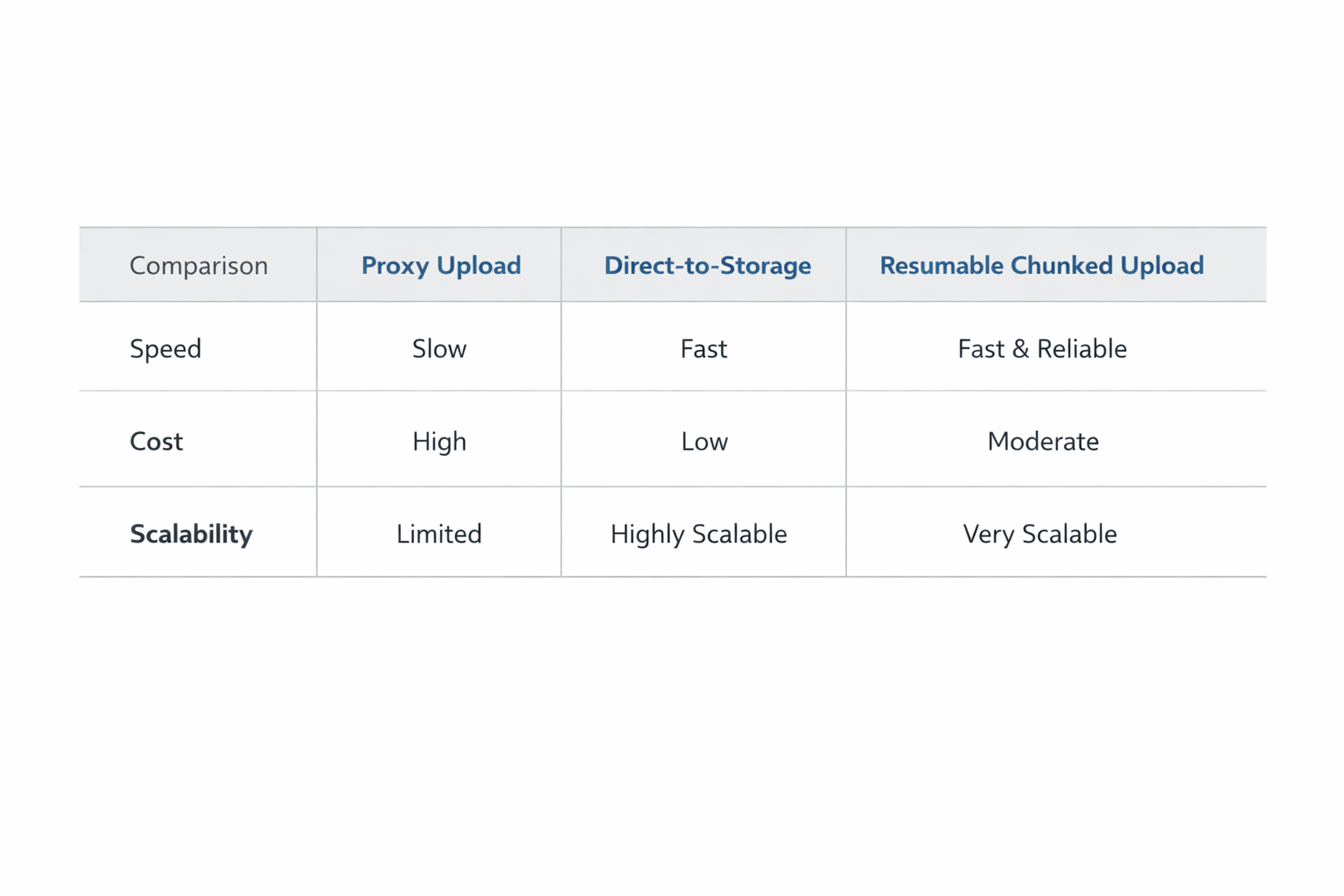
Historically, many apps proxied uploads through the application server. That approach is easy to understand but expensive in practice: the browser sends the file to your app, your app buffers or streams it, then your app sends it again to storage. That means double bandwidth, more latency, and more opportunities for timeouts. In serverless environments, it can also collide with request body limits, execution time limits, or memory constraints. Next.js Route Handlers exist for request orchestration, but they are not a reason to funnel large binary payloads through your app layer if storage can receive them directly. (nextjs.org)
Direct-to-storage patterns solve that by splitting responsibilities:
Next.js authenticates the user and authorizes the upload.
Your backend issues a short-lived presigned URL, signed token, or multipart upload session.
The browser uploads the file directly to object storage.
Your app stores metadata and handles downstream workflows like virus scanning, transcription, or thumbnail generation.
This architecture is now the standard because major object storage systems provide first-class support for upload authorization. Amazon S3 supports presigned URLs for upload, including time-limited access and integrity checks; Google Cloud Storage supports signed URLs for time-limited access to objects; and Vercel Blob supports browser uploads with a dedicated client upload flow. (docs.aws.amazon.com)

A practical rule of thumb: if the file is larger than a few megabytes, or if you expect meaningful upload volume, do not proxy the file through your Next.js app unless you have a very specific reason. Proxying is sometimes appropriate for tiny files, strict inline validation, or legacy integrations, but it should be the exception rather than the default. (docs.aws.amazon.com)
2) Choose your architecture: Next.js API route, Node.js backend, or serverless function
There are three common orchestration options for a Next.js file upload service: a Next.js API route/route handler, a separate Node.js backend, or a serverless function. Each can work; the right choice depends on your scale, deployment environment, and operational constraints.
Next.js Route Handler or API route
Next.js Route Handlers let you create custom request handlers using the Web Request and Response APIs inside the App Router. They are the modern replacement for many API route use cases and are ideal when your upload logic is tightly coupled to the front end, such as generating signed URLs after checking the current session. Next.js also documents that Route Handlers support methods like POST, PUT, and DELETE, which makes them a natural fit for upload orchestration endpoints. (nextjs.org)
Use this option when:
Your app is already on Next.js full-stack.
The upload orchestration logic is lightweight.
You only need to generate a signed URL or create metadata records.
Separate Node.js backend
A dedicated backend is better when upload logic becomes a platform concern: multiple front ends, mobile clients, internal tools, more complex authorization, or a processing pipeline with queues and workers. It also helps when your upload flows need specialized libraries, deeper observability, or dedicated scaling. For example, you might keep the Next.js app as the public UI and move file orchestration to a services layer that serves web, mobile, and partner integrations alike.
Use this option when:
Uploads are used by multiple clients.
You need queue-based post-processing.
You want independent scaling and deployment.
You need richer server-side logic than a route handler can comfortably hold.
Serverless function
A serverless function is often the simplest way to issue signed URLs or validate upload requests, especially if your app already deploys to a serverless platform. But serverless adds constraints: request duration, cold starts, body size limits, and provider-specific throughput characteristics. Those constraints matter less if the serverless function only signs requests and never receives the file itself. (nextjs.org)
Use this option when:
You need a small, isolated orchestration endpoint.
Upload initiation is bursty and stateless.
You want operational simplicity over full control.
Architecture recommendation
For most 2026 Next.js apps:
Use a Next.js Route Handler or serverless function to authenticate and authorize.
Generate a presigned URL or multipart session.
Upload the file directly from the browser to storage.
Persist metadata in your database.
Trigger background processing for validation, scanning, or media transformations.
That pattern minimizes infrastructure complexity while keeping your app responsive. (docs.aws.amazon.com)
3) Client-side upload UX: picker, drag-and-drop, progress bars, validation, and errors
A good upload system lives or dies by its client experience. Users need immediate feedback, predictable constraints, and clear recovery paths when something goes wrong. Modern upload UIs usually support a basic file picker plus drag-and-drop, with optional previews and multi-file selection.
File picker and drag-and-drop
The simplest implementation uses a native file input. For better usability, add drag-and-drop and clickable drop zones. The browser still gives you the actual File objects; the difference is only interaction design. For advanced flows, separate the selection step from the actual upload step so users can review files before transmission.
Validation before upload
You should validate as early as possible on the client, but treat client validation as a convenience, not a security boundary. Typical checks include:
file size
allowed MIME types
allowed extensions
number of files
image dimensions, if relevant
OWASP recommends allowlists, content-type checks, file signature validation, filename safety, and size limits, while warning that Content-Type can be spoofed. (cheatsheetseries.owasp.org)
Progress bars and upload state
Users need to know whether a large file is uploading, stalled, failed, or complete. For upload progress, browser APIs matter: MDN documents that XMLHttpRequest.upload exposes an object that can be observed to monitor upload progress. In practice, many teams still use XHR for progress events, even if the rest of the app is built around fetch. (developer.mozilla.org)
For modern UI state, track:
selectedvalidatingrequesting-signed-urluploadingprocessingcompletefailedretrying
Error handling and retries
Treat upload failures as normal, not exceptional. Common failure categories include:
network interruption
expired signed URL
storage permission errors
file too large
invalid content type
backend authorization failure
Your client should surface a human-readable message and, where possible, a recovery option. For unreliable networks, retry the request that obtains the signed URL and retry the file transfer if the storage protocol supports it. For multipart uploads, retry failed parts rather than restarting from zero.

A strong client UX does not just feel polished; it prevents support tickets by making constraints visible before the upload begins and making failures recoverable when they occur.
4) Server-side upload strategy: presigned URLs, signed tokens, multipart PUT/POST, and when not to proxy
Your server’s job is usually to authorize, not to carry bytes. The most important architectural choice is whether your app server should touch the file at all.
Presigned URLs
A presigned URL is a time-limited URL that grants access to upload or download a specific object. Amazon S3 explicitly supports presigned URLs for uploads, including expiration controls and integrity checks; Google Cloud Storage supports signed URLs for time-limited access as well. (docs.aws.amazon.com)
Use presigned URLs when:
you want browser-to-storage uploads
the file destination is known in advance
you need short-lived access with minimal server load
Signed tokens
Some systems use signed tokens instead of a raw upload URL. A token can encode:
user ID
allowed MIME types
max size
destination key prefix
expiration
single-use nonce
The browser then sends that token to a storage gateway or upload service. This is often useful when your storage provider or your platform prefers token-based flows.
Multipart PUT/POST
Multipart uploads matter for large files and unreliable connections. Amazon S3 supports multipart upload, and Vercel Blob now documents multipart uploads through its SDK as well. Multipart splits a large file into parts that can be uploaded independently and completed later. (docs.aws.amazon.com)
Multipart is especially useful when:
files are tens or hundreds of megabytes
upload failures are common
you want part-level retries
users may pause and resume
When to avoid proxying through your app
Avoid proxying when:
the file is large
you pay by egress and ingress
you use serverless
the app is latency-sensitive
you want to scale uploads independently of app traffic
Proxying can still be acceptable for:
very small files
strict inline sanitization
private internal tools
legacy systems that cannot do direct-to-storage
But if you can avoid it, do so. The storage service is built for this workload; your app server usually is not. (docs.aws.amazon.com)
5) Storage layer options: Vercel Blob, Amazon S3, Google Cloud Storage, and more
Choosing storage is not just a vendor decision. It affects latency, pricing, access patterns, operational complexity, and how much of your pipeline you need to build yourself.
Vercel Blob
Vercel Blob is an object storage service designed for file uploads at runtime and build time. Its documentation highlights use cases like avatars, screenshots, videos, and files you would otherwise store externally. It also supports browser uploads and multipart upload flows through the SDK. (vercel.com)
Choose Vercel Blob when:
your app is already on Vercel
you want fast setup
you prefer integrated developer experience
you need a managed storage layer without a separate cloud account workflow
Amazon S3
Amazon S3 remains the most common choice for production upload systems because of its ecosystem, durability, presigned URL support, multipart upload support, and broad compatibility with tooling. AWS documents presigned URLs for upload and multipart upload for larger objects. (docs.aws.amazon.com)
Choose S3 when:
you need the broadest ecosystem support
you want deep control over IAM and bucket policy
you expect to integrate with multiple downstream AWS services
you need a mature, well-understood object storage foundation
Google Cloud Storage
Google Cloud Storage also supports signed URLs, including V4 signing, and is a strong choice for teams already on Google Cloud. Signed URLs allow time-limited access to a specific object, and Google documents how to create them with tooling and client libraries. (docs.cloud.google.com)
Choose GCS when:
your infrastructure is centered on Google Cloud
you use GKE, Cloud Run, or related services
you want signed URL support with GCP-native workflows
Other providers
Other object storage providers can also fit this pattern, especially S3-compatible services. The right choice often comes down to:
upload API support
multipart/resumable semantics
geographic reach
lifecycle and retention tooling
access control model
pricing for ingress, storage, retrieval, and egress
For application design, object storage should behave like a durable blob store, not like a database. Store objects there, and keep metadata and business logic in your application layer.
6) Handling large files: streaming, chunked uploads, resumable transfers, and retry logic
Large files are where naïve implementations break. A 2 MB avatar and a 4 GB video cannot use the same upload strategy. For large content, your goals are to minimize memory usage, recover from failures, and avoid re-uploading everything when only one segment fails.
Streaming versus buffering
If you must receive uploads in your app for any reason, stream instead of buffering when possible. Buffering entire files in memory is a common source of server instability. That said, for large files, the better option is still direct-to-storage rather than streaming through your application server.
Chunked uploads
Chunked uploads divide a file into parts. Each part is uploaded independently, which allows:
parallelism
part-level retry
better recovery on flaky networks
progress reporting with more granular accuracy
Amazon S3 documents multipart upload, and its guidance notes multipart upload for large objects. Vercel Blob also documents multipart upload flows in its SDK. (docs.aws.amazon.com)
Resumable transfers
Resumable uploads go further than simple multipart by allowing uploads to continue after the browser closes, the connection drops, or the user navigates away. A resumable design typically persists:
upload session ID
file fingerprint
completed part numbers
chunk size
expiration timestamp
This state can live in your database or a short-lived session store.
Retry logic
Retries should be intelligent:
retry transient network failures
retry only the failed chunk, not the entire file
back off exponentially
stop retrying after a bounded threshold
refresh expired signed URLs when needed
For unreliable networks, the most practical production pattern is:
request upload session
upload chunk
record completion
retry only missing chunks
finalize upload
mark metadata complete
When resumability matters most
Use resumable uploads for:
video files
media libraries
enterprise document ingestion
scientific datasets
mobile users on unstable connections
For small files, the added complexity may not be worth it. But once files become user-visible assets rather than incidental attachments, resumability pays for itself quickly.
7) Security and governance: checks, limits, auth, expiring URLs, and malware scanning
File uploads are a common attack surface, so your security posture must be layered. OWASP recommends allowlisting extensions, validating file type and signatures, renaming files, applying size limits, storing files outside the webroot or on a separate server, using least privilege, and scanning for malware where possible. (cheatsheetseries.owasp.org)
MIME and type checks
Never trust the browser-supplied MIME type alone. Use:
extension allowlists
MIME inspection
magic-byte or signature validation
content-specific validators for images, PDFs, and archives
OWASP explicitly warns that content-type can be spoofed. (cheatsheetseries.owasp.org)
Size limits
Enforce limits at multiple layers:
client-side precheck
server-side authorization logic
storage-service policy
reverse proxy or edge gateway where applicable
This defends against accidental abuse and resource exhaustion attacks.
Authentication and authorization
Authentication answers “who is uploading?” Authorization answers “are they allowed to upload this file to this resource?” Both matter. A signed URL should be tied to a specific user, purpose, and destination. Avoid generic “upload anywhere” tokens.
Expiring URLs and least privilege
Use short-lived signed URLs and scope them narrowly:
one file
one bucket or prefix
one operation
one short expiration window
AWS explicitly documents presigned URLs as time-limited access, and Google Cloud Storage signed URLs are likewise time-limited. (docs.aws.amazon.com)
Malware scanning
If files are user-supplied and later downloaded or processed, scanning is strongly recommended. OWASP suggests antivirus or sandbox validation and CDR where applicable. A common production setup is:
upload file to quarantine storage
emit event
scan file asynchronously
mark clean or quarantine
only then publish or expose the file
Governance and auditability
For enterprise contexts, define policies for:
retention
deletion
legal hold
access logging
user data deletion requests
content moderation
file provenance
A secure upload service is not just a transport layer. It is a governance boundary for user-generated content.
8) Database and metadata design: records, ownership, status, URLs, and cleanup
The object storage bucket should hold the bytes; your database should hold the truth about the file’s lifecycle. This separation makes the system easier to query, govern, and maintain.
Recommended metadata fields
At minimum, a file record often includes:
idowner_user_idtenant_idor account IDstorage_providerbucketobject_keyoriginal_filenamemime_typesize_byteschecksumstatusvisibilitycreated_atuploaded_atprocessed_atdeleted_at
Status model
A practical state machine might look like:
initiateduploadinguploadedscanningreadyrejectedexpireddeleted
This is important because many “upload bugs” are actually state bugs. The file may be in storage but not yet available to users, or uploaded but still pending virus scanning.
Ownership and authorization
Your database must answer:
who owns this file?
which project or tenant does it belong to?
who may view it?
who may delete it?
is it public or private?
These answers should not be inferred from the bucket layout alone. Keep authorization logic in the application layer.
Cleanup and lifecycle management
Orphaned files happen. Users abandon uploads, scans fail, retries stall, and background jobs crash. To prevent storage creep:
expire abandoned upload sessions
delete temporary objects after timeout
run periodic reconciliation jobs
compare DB records with object listings
purge failed or stale files automatically
If you are storing public URLs, remember that the database should store canonical object references, not just a raw URL that may later change. URLs can be derived from storage keys and access mode.
A clean metadata model is what lets your upload service survive months of organic growth without becoming an unmaintainable pile of one-off states.
9) Performance and scalability: edge vs serverless, bandwidth costs, caching, and observability
Once uploads become common, the performance conversation shifts from “can it work?” to “how much does it cost, and how well can we see it?”
Edge vs serverless tradeoffs
Edge runtimes are attractive for low-latency auth and lightweight request shaping, but upload orchestration often needs provider SDKs, signing libraries, or runtime features that are easier in serverless or Node.js backends. Also, if you only need to mint a signed URL, the latency difference between edge and serverless may be less important than simplicity and compatibility.
The key operational point is that your app server should not carry file bandwidth unless there is a strong reason to do so. Direct-to-storage reduces application egress, memory pressure, and concurrency load. (docs.aws.amazon.com)
Bandwidth costs
Upload traffic is expensive when it traverses your app server. Proxying a file doubles the path:
user to app
app to storage
Direct-to-storage avoids that extra hop. For high-volume applications, this can materially reduce cost and improve throughput.
Caching
Uploads themselves are not cacheable in the conventional sense, but metadata fetches, processing status endpoints, and file listing APIs often are. Cache what is safe:
upload form configuration
allowed file types
tenant-specific quotas
upload status snapshots for short periods
Avoid caching anything that could expose stale authorization state.
Observability
Instrument the entire pipeline:
upload initiation count
signed URL issuance latency
upload completion rate
chunk retry rate
time-to-ready
scan pass/fail counts
storage errors
orphan cleanup counts
OWASP’s logging guidance emphasizes logging security-relevant events, and file upload virus detection is one of the meaningful application events to record. (cheatsheetseries.owasp.org)
Scaling strategy
As traffic grows, scale each layer independently:
auth/signing endpoint
database writes
background processing workers
storage throughput
antivirus scanning queue
This decoupling is one of the main advantages of direct-to-storage: file ingress is no longer coupled to app responsiveness.
10) Deployment, testing, and maintenance: local dev, production rollout, monitoring, and failures
A file upload service needs as much operational discipline as any other critical backend system.
Local development
For local development, emulate the production path as closely as possible:
use the same upload API contract
use a local or sandbox storage bucket
test signed URL generation
verify CORS if the browser uploads directly to storage
simulate failures and expired credentials
If your production app uses multipart uploads, test multipart in development too. Do not assume a single-shot upload will behave the same.
Production rollout
Roll out in stages:
start with a small internal cohort
monitor upload success and error rates
validate cleanup and scanning
enable larger files later
add resumability only after the base flow is stable
Common failure cases
The most common issues are usually not exotic:
signed URL expired too soon
bucket policy blocked the request
CORS misconfiguration
mismatched content type
object key collision
file too large
network drop during chunk transfer
scan job never ran
DB record created but object never uploaded
object uploaded but DB row never finalized
Maintenance tasks
Keep an ongoing maintenance checklist:
rotate secrets and keys
review bucket policies
audit upload limits
update file type allowlists
verify malware scanning coverage
prune stale sessions
reconcile orphaned objects
inspect logs for repeated client errors
Testing strategy
Test at several levels:
unit tests for validation and state transitions
integration tests for signed URL generation
end-to-end tests for browser upload flows
resilience tests for network failures
security tests for unauthorized access and malformed files
A file upload service is one of those systems that seems stable right up until it encounters scale, hostile input, or a cloud configuration mistake. Testing should reflect that reality.
Conclusion: key takeaways
A modern Next.js file upload service in 2026 should usually follow a direct-to-storage design, not a proxy-through-app design. That keeps your application fast, reduces infrastructure cost, and aligns with the capabilities of object storage platforms that support presigned or signed upload access. (docs.aws.amazon.com)
The core production pattern is straightforward:
authenticate and authorize in Next.js
issue a short-lived upload credential
upload directly to storage
store file metadata in your database
process and scan asynchronously
clean up stale or failed uploads
If you get the foundations right—validation, resumability, security, and observability—the upload layer becomes a reliable service rather than a recurring source of bugs.