Database Migrations Done Right in Production: Zero-Downtime Strategies That Work
June 23, 2026
Database migrations are one of the most nerve-racking parts of software delivery because they sit at the intersection of code, data, availability, and user trust. A bad deploy can break queries, stall writes, or create hidden inconsistencies that don’t show up until traffic spikes. The good news: with the right patterns, tooling, and rollout discipline, you can make even substantial schema changes safely in production.
This post walks through a practical playbook for zero-downtime database migrations. It focuses on the realities of production systems: table locks, replication lag, schema drift, large backfills, and rollback constraints. It also covers the operational side—observability, validation, and safe deployment sequencing—so your changes can move through CI/CD with far less risk. Tools such as Liquibase and Flyway help teams manage database changes as code, while online schema change utilities like gh-ost and pt-online-schema-change help reduce blocking on busy MySQL tables. MySQL’s native online DDL features, and PostgreSQL utilities like pg_repack, can also play a role depending on the database engine and the exact change being made. (liquibase.com)

1. Why Production Database Migrations Are Hard
Production migrations are hard because databases are not just storage engines; they are shared, stateful coordination points for the entire application. Even a seemingly simple change like adding an index, changing a column type, or renaming a field can introduce blocking, metadata locks, or prolonged write amplification. MySQL documentation notes that online DDL still has limitations: transactions holding metadata locks can block an operation, and long-running or inactive transactions may cause the DDL to time out. MySQL also warns that online DDL can fail if the online log grows too large under heavy concurrent writes. (dev.mysql.com)
Replication adds another layer of risk. A migration that is “fast enough” on the primary can still create lag downstream, delaying reads, failovers, or analytics jobs. In distributed production systems, the database and the application often evolve at slightly different speeds. That creates schema drift: one app version expects a new column while another app version still writes the old one. If you deploy code and schema in the wrong order, your app can start failing even if the migration itself technically succeeded. This is why production migrations are not just DDL statements—they are coordinated releases with dependencies, timing, and rollback implications. (liquibase.com)
A useful mental model is that the failure modes of migrations are often operational rather than syntactic. The SQL may be valid, but the production environment can still reject it because of traffic, lock contention, replication topology, or storage constraints. That is why teams need explicit migration design, not just an ORM-generated script. The database may accept the statement, but the service may not survive the journey. (dev.mysql.com)
2. Core Principle: Treat Schema Changes Like Code Changes
The safest teams treat database changes as first-class code: versioned, reviewed, tested, and deployed through repeatable automation. Liquibase explicitly frames database change management around version control, CI/CD automation, change tracking, and drift detection, while Flyway’s core model is built around versioned migrations. The key idea is simple: schema changes should pass through the same quality gates as application changes. (liquibase.com)
That means migrations belong in source control, not in ad hoc runbooks or one-off SQL scripts sent over chat. It also means they should be reviewed by someone who understands both the application behavior and the database consequences. A migration review should answer questions like: Is it backward-compatible? Does it force a full table rewrite? Does it need an index before the app starts using the new column? Can it be rolled back cleanly? Those are software engineering questions, but they are also data safety questions. (liquibase.com)
Testing matters just as much. Good teams rehearse migrations in staging with production-like data volume and traffic patterns, because lock behavior and backfill performance can differ dramatically at scale. A migration that works fine on a small database can fail in production once the table reaches millions of rows or once replicas start falling behind. This is especially important for online DDL and copy-based tools, which can behave differently depending on table size and concurrent write load. (dev.mysql.com)
3. The Expand/Contract Pattern for Backward-Compatible Deployments
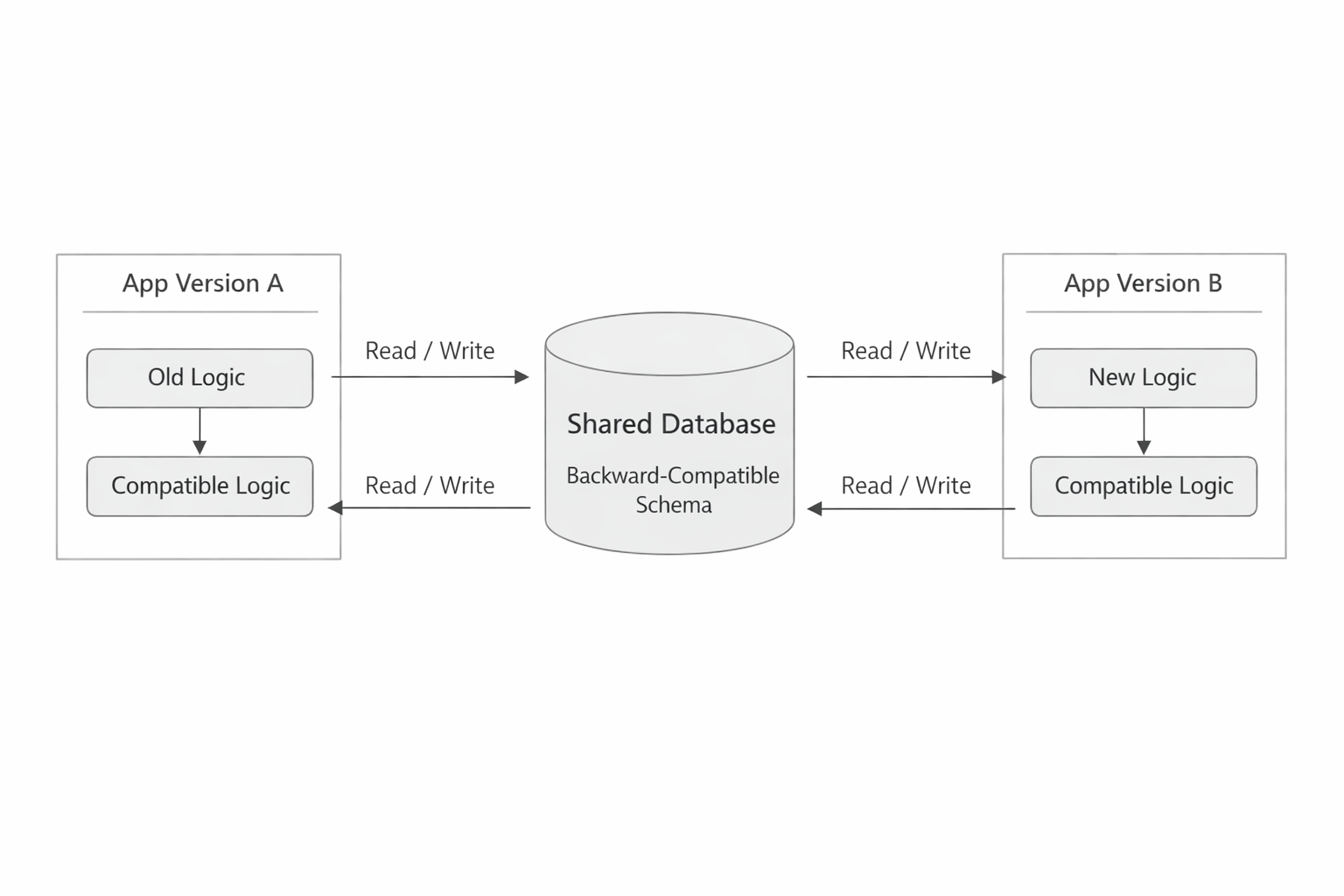
The expand/contract pattern is the most reliable way to evolve schemas without downtime. In the expand phase, you add new database structures in a way that does not break existing application versions. In the contract phase, after the app has fully switched to the new behavior and old data paths are no longer needed, you remove the obsolete columns, indexes, or tables. This sequencing keeps old and new app versions compatible during the transition. (liquibase.com)
A typical example is renaming a column. Direct renames are dangerous because old app code may still reference the old name. Instead, you add the new column, update the application to write to both old and new fields if needed, backfill the new field from existing data, and later remove the old field once you are confident nothing depends on it. The same idea applies to new tables, index changes, and type changes. The schema grows first; the app catches up; cleanup comes last. (liquibase.com)
This pattern works because it accepts that deployments are not instantaneous. In real systems, multiple app versions often run at the same time behind a load balancer or within a rolling deployment. Expand/contract gives those versions a shared compatibility window. Without that window, your database can become a single point of deployment failure. With it, schema evolution becomes a sequence of safe incremental moves rather than a cliff edge. (liquibase.com)
4. Online Schema Change Techniques for Large Tables and High-Traffic Databases
When tables are large or traffic is heavy, native ALTER TABLE may still be too risky even if the engine supports online operations. That is where online schema change tools come in. MySQL’s native online DDL supports instant and in-place alterations for many operations, with concurrency controls such as ALGORITHM=INSTANT, ALGORITHM=INPLACE, and LOCK=NONE when supported. But MySQL also documents important limitations around metadata locks, space requirements, and failure conditions. (dev.mysql.com)
For MySQL, gh-ost and pt-online-schema-change are common choices when the built-in path is not sufficient. gh-ost is a triggerless online schema migration tool that copies rows into a ghost table while reading changes from the binary log, giving operators more control over cutover timing and reducing trigger overhead. Percona’s pt-online-schema-change also works on a table copy and is explicitly designed to emulate MySQL’s internal alter behavior while allowing concurrent reads and writes. (github.com)
For PostgreSQL, pg_repack is often used to reorganize bloated tables and indexes without the downtime associated with VACUUM FULL or similar blocking operations. The PostgreSQL wiki describes the need for such tools precisely in cases where a busy table cannot afford long exclusive locks. The key point is that “online” does not always mean “zero-risk”; it means the work is designed to coexist with application traffic as much as possible. (wiki.postgresql.org)
The right technique depends on the operation. Adding a nullable column may be easy with native online DDL. Rebuilding a massive index on a hot table may require a copy-based approach with throttling. Repacking a bloated PostgreSQL table may be an operational maintenance task, not a schema redesign. Good migration strategy starts with matching the tool to the workload, not the other way around. (dev.mysql.com)
5. Safe Rollout Strategy: Deploy App First, Then Expand Schema, Backfill, and Contract Later
A safe rollout usually begins with the application, not the database. First, deploy code that can tolerate both the old and new schema. Then apply the expansion migration. After that, backfill any new data or derived values. Only when all traffic is safely using the new paths do you contract the schema by removing old columns, code paths, or supporting structures. This sequence is the heart of zero-downtime change management. (liquibase.com)
Why app first? Because if the app can read both versions of the schema, the database change becomes additive instead of breaking. For example, you can ship code that ignores a new column before the column exists. Once that code is live, you add the column. Then the application can start writing to it, while older code still works because the old fields remain intact. That avoids the “new code talks to old schema” mismatch that causes many migration failures. (liquibase.com)
The backfill step should be separated from the deployment step whenever possible. Backfills often touch many rows, can create replication lag, and may need their own throttling and monitoring. If the app already supports both schema versions, the backfill can run independently and slowly, reducing production risk. Once confidence is high and the old path is no longer needed, contraction can happen in a later release. That delayed cleanup is not wasteful; it is what makes the earlier changes safe. (dev.mysql.com)
6. Rollback Strategy: Reversible Migrations, Feature Flags, and Forward-Fix Plans
Rollback planning should happen before a migration is approved, not after it fails. The ideal case is a reversible migration: if something goes wrong, you can restore the old schema or revert the deployment without data loss. Liquibase supports rollback-oriented workflows and change tracking, and its documentation emphasizes targeted rollbacks and auditability. But many real-world schema changes are not perfectly reversible, especially once data has been backfilled or old columns have been dropped. (liquibase.com)
That is where feature flags and forward-fix plans become essential. A feature flag can disable the new code path immediately without touching the database, buying time to investigate. If the schema change itself cannot be undone safely, the forward-fix plan is often the more realistic option: instead of rolling back the database, you deploy a new migration that repairs the issue while keeping the system forward-moving. This is especially important for changes that are costly to reverse, such as large backfills or destructive column removals. (liquibase.com)
A practical rollback checklist should include three questions: Can the application be disabled independently of the schema? Can the schema be reverted without losing data? If not, what is the forward-fix path and how quickly can it be executed? The best teams assume rollback may be partial rather than perfect, and they design migrations so that partial failure is still recoverable. That usually means additive changes first, destructive changes last. (liquibase.com)
7. Data Backfills at Scale: Batching, Throttling, Idempotency, and Monitoring
Backfills are where many “safe” migrations become unsafe. Updating millions of rows in a single transaction can lock resources, increase replication lag, or overwhelm the online DDL machinery. MySQL documents that online alter logs can overflow under heavy concurrent writes, and that large or long-running operations can fail. That means backfills must be treated as production jobs with explicit rate limits and observability. (dev.mysql.com)
The standard pattern is batching. Process a fixed number of rows at a time, commit frequently, and leave room for other workload on the database. Throttling is equally important: if replica lag increases or lock wait time rises, slow the job down or pause it. This is one of the main reasons tools like gh-ost are valued in production—they offer pausability and dynamic control so operators can respond to load instead of forcing the job to continue blindly. (github.com)
Idempotency makes backfills safe to retry. If a batch fails halfway through, re-running it should not duplicate data or corrupt state. That usually means writing updates as deterministic transformations: “set this value to the canonical result if it is missing or stale,” not “increment this counter once.” Monitoring should cover batch duration, rows processed per minute, error counts, lock waits, and replica lag. If those numbers move in the wrong direction, the backfill should be treated like any other production incident: slow down, diagnose, and stabilize before continuing. (dev.mysql.com)
8. Choosing the Right Tools: Flyway/Liquibase, gh-ost, pt-online-schema-change, pg_repack, and Native Online DDL
There is no universal migration tool; there is only a best-fit tool for a specific database, change type, and operational tolerance. Flyway and Liquibase are best thought of as migration orchestration and governance tools. They version and track changes, integrate with CI/CD, and help teams apply schema changes consistently across environments. Liquibase also emphasizes changelogs, version control, drift detection, and rollback workflows. (liquibase.com)
For MySQL schema changes on busy tables, gh-ost and pt-online-schema-change are common options. gh-ost uses binary log streaming rather than triggers, which helps reduce operational overhead and gives more control over cutover timing. pt-online-schema-change copies the table and can be appropriate when its trigger-based design fits the environment and operational constraints. Both are used to avoid blocking the primary workload during structural changes. (github.com)
For PostgreSQL, pg_repack is the standout tool in this category when the problem is table or index bloat rather than a full application migration workflow. Meanwhile, native online DDL should always be your first question in MySQL and other engines that provide it, because instant or in-place operations are simpler and often safer than external tooling when the change is supported. MySQL’s own manuals recommend using ALGORITHM=INSTANT or ALGORITHM=INPLACE where possible, while also noting the limitations that may force a different approach. (dev.mysql.com)
9. Observability and Validation: Migration Metrics, Lock Times, Replication Health, and Post-Deploy Checks
A migration is not complete when the DDL finishes; it is complete when production has stabilized. That means you need observability before, during, and after the change. At minimum, track migration duration, lock acquisition time, replication lag, query latency, error rates, and any increase in deadlocks or metadata lock waits. MySQL’s documentation makes it clear that online DDL can still be blocked by metadata locks and can fail under heavy write pressure, so monitoring those conditions is not optional. (dev.mysql.com)
Validation should include both database-level and application-level checks. Database-level validation can confirm the new column exists, the index was built, the row counts match, and replicas are healthy. Application-level validation confirms that the new code path is actually reading and writing the intended schema. In practice, this often means checking logs, dashboards, and a small set of real user flows after deployment. If the migration introduced a new write path, confirm that the backfill completed and that older code paths are no longer emitting writes to deprecated fields. (liquibase.com)
Good observability also creates safer cutovers. Tools like gh-ost were designed with pausability and dynamic control, precisely because operators need to react to production signals rather than trusting a fixed schedule. The more critical the system, the more important it becomes to treat migration metrics as first-class release metrics. If you cannot see the migration’s effect on the system, you are guessing. (github.com)
10. Latest Trends and Statistics: Growing Enterprise Migration Complexity, On-Time Delivery Challenges, and AI-Assisted Migration Workflows
Database work is getting more complex, not less. DB-Engines’ June 2026 ranking shows major relational systems like Oracle, MySQL, Microsoft SQL Server, and PostgreSQL continuing to dominate the landscape, which is a reminder that enterprises still operate large, heterogeneous estates where migration safety matters at scale. IBM has also described database administration as increasingly complex due to hybrid and multi-cloud environments, growing data volumes, and skills shortages. (db-engines.com)
The operational challenge is not just technical difficulty; it is delivery reliability. Migration projects often span multiple systems, teams, and dependencies, which makes on-time delivery harder as the blast radius grows. As a result, enterprises are increasingly leaning on AI-assisted workflows to reduce manual coordination, surface recommendations, and streamline troubleshooting. IBM’s recent database and migration announcements describe AI-powered assistants and agentic workflows that help DBAs and migration teams work faster and with less cognitive overhead. (ibm.com)
There is also a broader tooling trend toward “pipeline as software.” Change sets, policy checks, automated recommendations, and observability are converging into more intelligent deployment systems. That does not replace engineering judgment, especially for production schema changes, but it can reduce routine toil and make risky steps more visible. In other words, the future of database migration is not autopilot; it is better assisted control. (liquibase.com)
Conclusion
Zero-downtime database migrations are absolutely achievable, but they require discipline. The safest pattern is to treat schema changes like code, deploy backward-compatible app changes first, expand the schema before using it, backfill carefully, and contract only after the new path is proven stable. When the database is large or busy, choose the right online schema technique for the engine and workload, and never assume that “online” means “risk-free.” (liquibase.com)
The strongest teams also plan rollback and observability up front. They use feature flags, reversible steps where possible, forward-fix plans when reversal is unsafe, and monitoring that watches locks, replication lag, and post-deploy correctness. With that combination, migrations stop being emergency events and start becoming routine engineering work. (docs.liquibase.com)