
Build a Todo App in Vue.js with Local State and API Sync
August 27, 2026
A todo app seems simple on the surface, but a production-ready version has to solve a surprisingly rich set of problems: fast interaction, reliable persistence, graceful offline behavior, and synchronization with a remote backend. In a modern Vue 3 application, the best user experience usually starts with local-first state: users should be able to add, edit, complete, filter, and delete tasks instantly, even before any network round-trip finishes. Then the app can sync those changes to an API in the background, reconcile server responses, and recover cleanly from failures.
This post walks through a practical architecture for building that kind of todo app with Vue 3 and the Composition API. We’ll use local reactive state for immediate UI updates, localStorage for persistence across reloads, and the Fetch API for backend synchronization. The key idea is to separate UI state, persisted state, and server state so each concern is predictable and testable. Vue 3’s Composition API is a good fit here because it makes state and side effects easier to group by feature instead of by lifecycle bucket. Vue’s reactivity system is designed around ref, computed, and watch, which are ideal for todo-style flows where state transformations are simple but frequent.
Because modern web apps need to feel fast and resilient, local persistence matters. localStorage is origin-scoped, survives browser restarts, and is synchronous, which makes it convenient for small datasets like todos but something you should use thoughtfully. The Fetch API, meanwhile, provides a promise-based way to make HTTP requests and explicitly requires you to check response.ok because network success and HTTP success are not the same thing. Those two browser APIs form the backbone of a straightforward local-first sync strategy.

1. Introduction: What a Modern Vue Todo App Should Solve, and Why Local-First UX Matters
A modern todo app should do more than store text in a list. It should make it effortless to capture tasks quickly, reflect edits immediately, survive refreshes, and synchronize changes with a backend without making the user wait. In practice, that means the app must support five properties at once:
Instant feedback when the user adds or toggles a task.
Persistence across reloads and browser restarts.
Offline tolerance so the app still works when the network is down.
Server sync for multi-device consistency and long-term storage.
Conflict awareness when local and remote data diverge.
Local-first UX is central because latency is expensive in the user’s head. If every checkbox toggle waits on a server, the app feels sluggish even on a good connection. By updating reactive state first and syncing to the backend afterward, you turn the network into a background concern. This pattern is especially effective for todo apps because task state is small, mostly structured, and easy to serialize. Vue’s declarative rendering makes the local state path straightforward: mutate a reactive array, and the DOM follows automatically.
There’s also a product reason to prefer local-first behavior. Users often interact with todo apps in short bursts: they open the app, add a few items, maybe filter a list, and leave. Requiring a stable backend connection for every action creates unnecessary friction. With local persistence, the app remains useful even if the API is unavailable. With later sync, the data eventually reaches the server. That combination gives you a much more forgiving experience than a strictly server-driven UI.
A good mental model is: the client owns immediacy, the server owns durability. The local app state is the source of truth for what the user sees right now; the server becomes the canonical record over time. The challenge is not choosing one or the other, but designing a clean bridge between them.
2. Project Setup with Vue 3 and the Composition API for Clean, Scalable Local State
Start with Vue 3 using Vite, which gives you a fast dev server and a simple build pipeline. The Composition API is the right default for a todo app because it keeps related logic together: task state, derived filters, persistence, and API methods can live in one composable or component module instead of being split across options like data, methods, and watch. Vue’s Composition API is the recommended way to organize logic in reusable functions, and its core primitives—ref, reactive, computed, and watch—fit todo state naturally.
A sensible project structure might look like this:
src/
  components/
    TodoInput.vue
    TodoList.vue
    TodoItem.vue
    TodoFilters.vue
  composables/
    useTodos.js
  services/
    todoApi.js
  App.vue
For a small app, you can keep everything in App.vue initially, but extracting a composable early is worth it. useTodos() can encapsulate task state and sync logic, leaving components focused on presentation. That separation pays off when you add tests, conflict resolution, or a second data source later.
A minimal setup with Vite usually looks like:
npm create vue@latest
npm install
npm run dev
Then define a composable around a reactive todo list:
// src/composables/useTodos.js
import { ref, computed, watch } from 'vue'

export function useTodos() {
  const todos = ref([])
  const filter = ref('all')

  const activeCount = computed(() =>
    todos.value.filter(todo => !todo.completed).length
  )

  const filteredTodos = computed(() => {
    if (filter.value === 'active') {
      return todos.value.filter(todo => !todo.completed)
    }
    if (filter.value === 'completed') {
      return todos.value.filter(todo => todo.completed)
    }
    return todos.value
  })

  return {
    todos,
    filter,
    activeCount,
    filteredTodos
  }
}
This establishes a clean local state model before you introduce persistence or sync. The principle is important: first make the UI state correct and reactive, then layer side effects on top. That keeps your architecture understandable and reduces the chance of mixing rendering logic with network concerns.
3. Designing the Todo Data Model, Component Structure, and Reactive State Flow
A robust todo model should be small but explicit. At minimum, each task needs an identifier, a title, a completed flag, and timestamps for sync/debugging. If you plan to sync with a backend, it helps to include metadata such as a dirty flag or a local-only clientId to distinguish unsynced records from confirmed server records.
A practical model looks like this:
{
  id: 'uuid-or-server-id',
  title: 'Ship the demo',
  completed: false,
  createdAt: '2026-08-27T12:00:00.000Z',
  updatedAt: '2026-08-27T12:05:00.000Z',
  dirty: true,
  deleted: false
}
The extra fields make sync logic much easier later. dirty tells you whether the local copy has changes not yet acknowledged by the server. deleted is useful when you want to support soft deletes during sync. Timestamps help you reason about conflict resolution and deterministic ordering.
A clean component split keeps responsibilities obvious:
TodoInput.vue: create new tasksTodoList.vue: render a collection of tasksTodoItem.vue: edit, complete, or delete one taskTodoFilters.vue: switch between all, active, and completed viewsApp.vueoruseTodos(): owns state and sync behavior
The reactive flow should be unidirectional where possible:
User triggers an action in a child component.
The child emits an event upward.
The parent/composable mutates local reactive state.
Watchers persist or sync the change.
Derived computed values update automatically.
That pattern matches Vue’s design well. You don’t need a complex global store for a todo app unless the app grows into multiple screens or collaborative workflows. A local composable plus a small service layer is usually enough.
Here is a basic example of task creation and toggling:
import { ref } from 'vue'

export function useTodos() {
  const todos = ref([])

  function addTodo(title) {
    const trimmed = title.trim()
    if (!trimmed) return

    todos.value.unshift({
      id: crypto.randomUUID(),
      title: trimmed,
      completed: false,
      createdAt: new Date().toISOString(),
      updatedAt: new Date().toISOString(),
      dirty: true
    })
  }

  function toggleTodo(id) {
    const todo = todos.value.find(t => t.id === id)
    if (!todo) return
    todo.completed = !todo.completed
    todo.updatedAt = new Date().toISOString()
    todo.dirty = true
  }

  return { todos, addTodo, toggleTodo }
}
This gives you a consistent local state source. Because Vue tracks array and object mutations reactively, the UI updates as soon as the todo changes. The main design goal here is to keep mutation logic centralized so persistence and sync code can observe it without duplicating business rules.
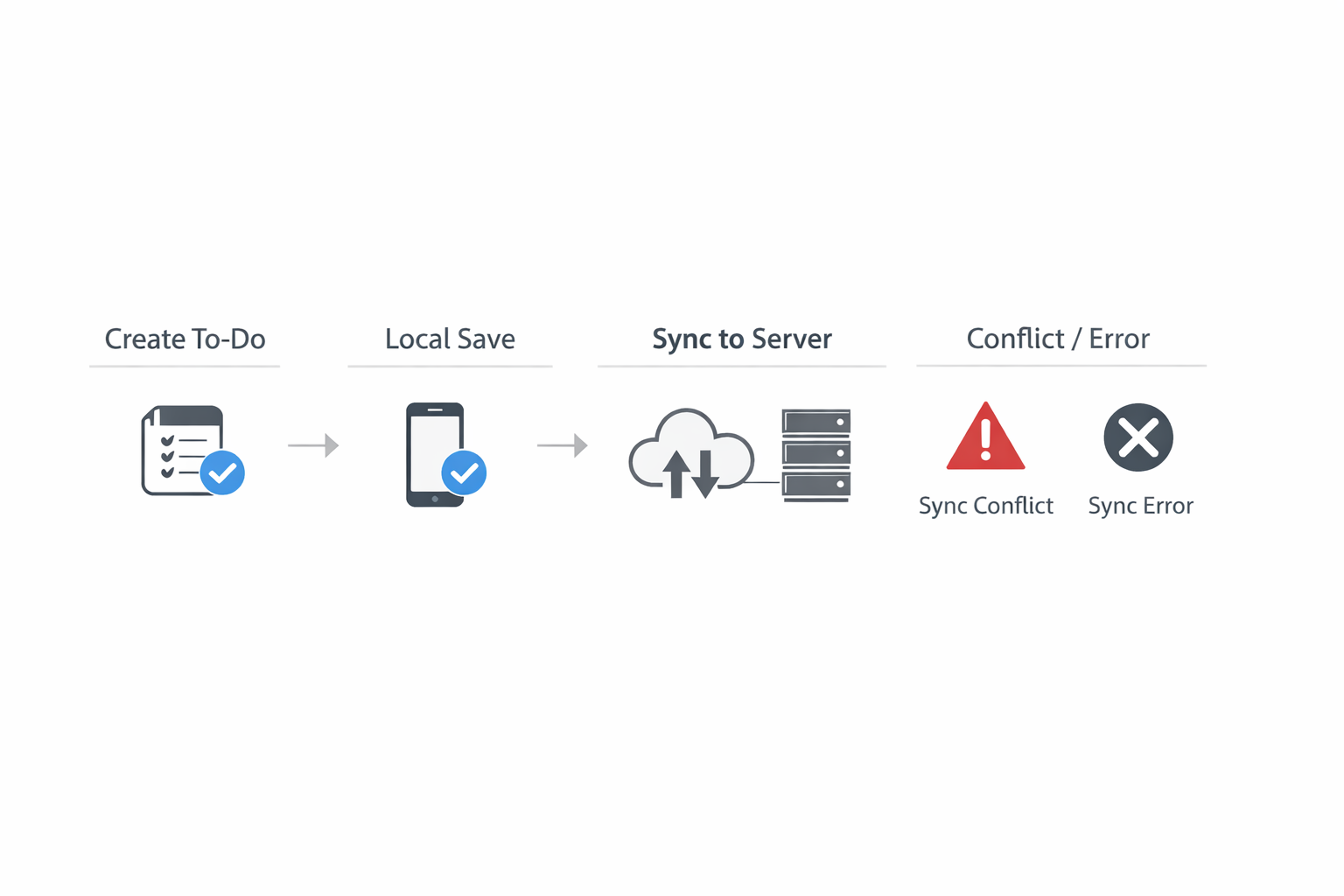
4. Persisting Tasks in localStorage for Fast Reloads and Offline-Friendly Behavior
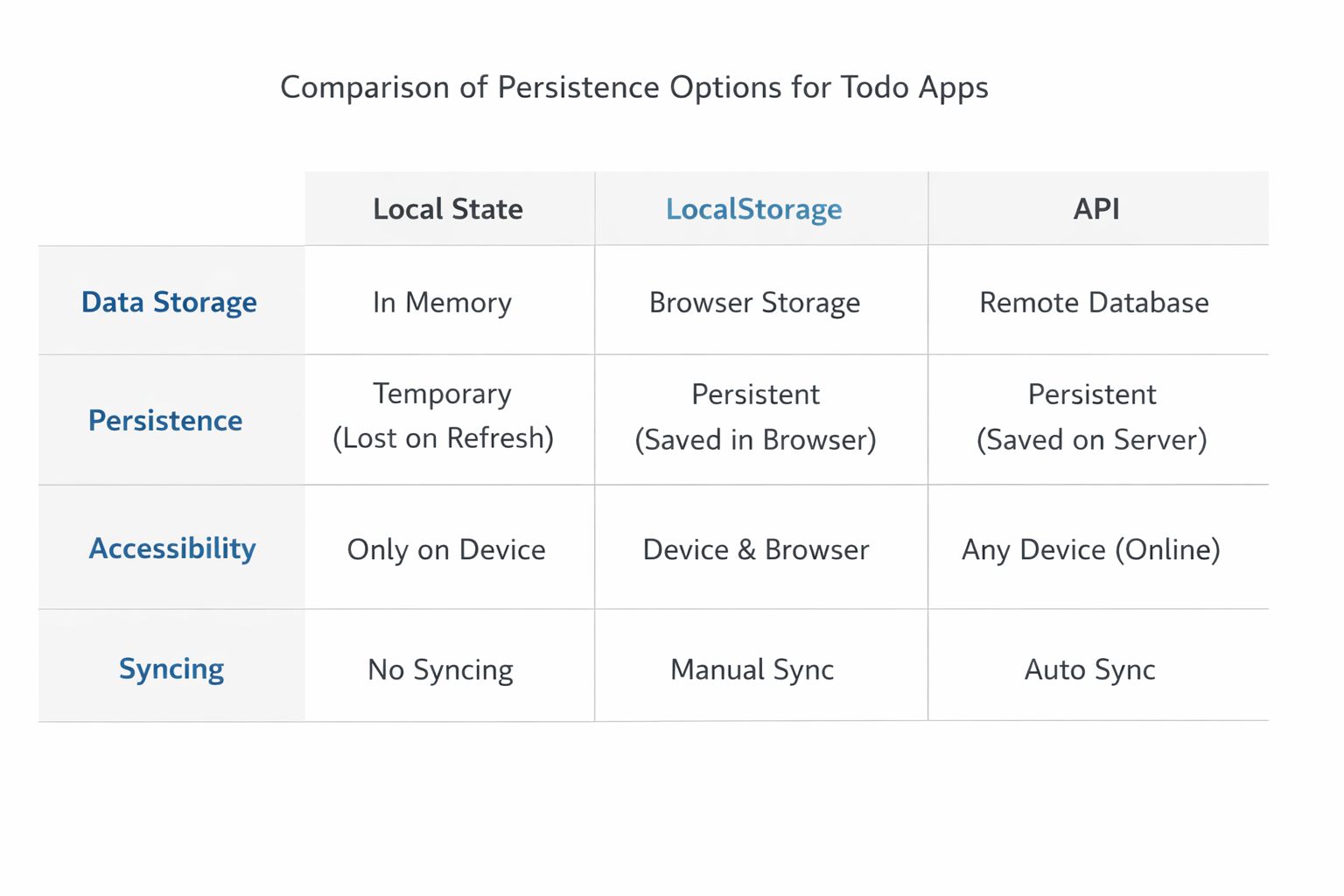
localStorage is the simplest way to persist a todo list on the client. It stores key/value pairs by origin, persists across browser restarts, and is available through the Window.localStorage property. It is also synchronous, which is fine for small payloads like a modest todo list but worth keeping in mind if your app starts storing large objects.
A standard pattern is:
load from
localStorageon startupinitialize reactive state with that data
watch the state and serialize changes back to
localStorage
Example:
import { ref, watch } from 'vue'

const STORAGE_KEY = 'todos:v1'

function loadTodos() {
  try {
    const raw = localStorage.getItem(STORAGE_KEY)
    return raw ? JSON.parse(raw) : []
  } catch {
    return []
  }
}

export function useTodos() {
  const todos = ref(loadTodos())

  watch(
    todos,
    (newValue) => {
      localStorage.setItem(STORAGE_KEY, JSON.stringify(newValue))
    },
    { deep: true }
  )

  return { todos }
}
This is simple and effective, but there are a few caveats. First, localStorage only stores strings, so JSON serialization is required. Second, because operations are synchronous, you should avoid excessively frequent writes in large apps. For a todo list, the performance cost is usually acceptable. Third, localStorage is origin-scoped, so the same app deployed on different domains or subdomains will have separate storage buckets.
If you want to reduce write frequency, debounce the watcher:
let saveTimer

watch(
  todos,
  (newValue) => {
    clearTimeout(saveTimer)
    saveTimer = setTimeout(() => {
      localStorage.setItem(STORAGE_KEY, JSON.stringify(newValue))
    }, 150)
  },
  { deep: true }
)
For offline-friendly behavior, local persistence is your first line of defense. If the API is temporarily unavailable, the app still launches with the last known task list. The user can continue interacting with the list, and sync can resume later. That’s the core advantage of local-first design: the app remains functional even when network state is not.
5. Connecting to a Backend with Fetch API for Create, Read, Update, and Delete Sync
The Fetch API is the browser-standard way to perform HTTP requests in modern JavaScript. It returns a Promise that resolves to a Response object, and importantly, it does not reject for HTTP error statuses like 404 or 500; you must check response.ok or response.status yourself.
For a todo app, a backend API usually exposes CRUD endpoints such as:
GET /todosPOST /todosPATCH /todos/:idDELETE /todos/:id
A small API wrapper keeps network logic isolated:
// src/services/todoApi.js
const BASE_URL = '/api/todos'

async function request(url, options = {}) {
  const response = await fetch(url, {
    headers: {
      'Content-Type': 'application/json',
      ...(options.headers || {})
    },
    ...options
  })

  if (!response.ok) {
    throw new Error(`Request failed: ${response.status}`)
  }

  return response.status === 204 ? null : response.json()
}

export const todoApi = {
  list() {
    return request(BASE_URL)
  },
  create(todo) {
    return request(BASE_URL, {
      method: 'POST',
      body: JSON.stringify(todo)
    })
  },
  update(id, patch) {
    return request(`${BASE_URL}/${id}`, {
      method: 'PATCH',
      body: JSON.stringify(patch)
    })
  },
  remove(id) {
    return request(`${BASE_URL}/${id}`, {
      method: 'DELETE'
    })
  }
}
This service layer gives you one place to handle headers, JSON parsing, and error conversion. It also makes testing easier because the rest of the app can treat API access as a simple dependency.
You should decide early whether the server or the client generates IDs. If the client generates IDs with crypto.randomUUID(), you can create tasks locally immediately and later POST them to the backend. If the server generates IDs, local items may need temporary IDs until the API responds. Both approaches work, but client-generated IDs make optimistic creation simpler.
The important takeaway is that local state and remote state should not be tightly coupled. The API wrapper should accept plain objects and return plain objects, while the composable decides how to merge those objects into reactive state.
6. Building Sync Logic for Hydration, Optimistic Updates, and Error Handling
Sync logic is where local-first apps become truly useful. The goal is to load remote data into local state once, then keep both sides aligned as users make changes. A clean sync flow usually has three phases:
Hydration: load cached local state immediately, then fetch remote state.
Optimistic update: apply the change to local state before the request finishes.
Reconciliation: replace or merge the local item with the server response.
Hydration matters because users should not see a blank list while waiting for the network. On app startup, read localStorage first so the UI renders instantly. Then call todoApi.list() and merge the result if the request succeeds. If the network fails, the app still works from local cache.
A simple hydration approach:
import { ref, onMounted } from 'vue'
import { todoApi } from '@/services/todoApi'

export function useTodos() {
  const todos = ref(loadTodos())
  const isLoading = ref(false)
  const error = ref(null)

  async function hydrate() {
    isLoading.value = true
    error.value = null

    try {
      const remoteTodos = await todoApi.list()
      todos.value = remoteTodos
    } catch (err) {
      error.value = 'Could not load remote todos.'
    } finally {
      isLoading.value = false
    }
  }

  onMounted(hydrate)

  return { todos, isLoading, error, hydrate }
}
For optimistic updates, update local state first and then sync:
async function createTodo(title) {
  const todo = {
    id: crypto.randomUUID(),
    title,
    completed: false,
    createdAt: new Date().toISOString(),
    updatedAt: new Date().toISOString(),
    dirty: true
  }

  todos.value.unshift(todo)

  try {
    const saved = await todoApi.create(todo)
    replaceTodo(todo.id, { ...saved, dirty: false })
  } catch (err) {
    todo.error = 'Failed to sync'
  }
}
This keeps the UI snappy. If the request fails, you can mark the task as unsynced rather than removing it immediately. That gives the user a chance to retry. The same pattern works for toggles, edits, and deletes. For deletions, many apps choose a soft-delete strategy locally so the item can be restored if sync fails.
Error handling should distinguish between:
transport errors: the request never reached the server
HTTP errors: the server responded with a failure code
validation errors: the backend rejected bad input
conflict errors: the same record changed elsewhere
Because Fetch resolves even on HTTP failure, always inspect the response status or wrap it in a helper that throws for !response.ok. That makes your optimistic logic much easier to reason about.
7. Handling Edge Cases: Request Failures, Conflict Resolution, and Duplicate Records
Edge cases are where sync logic becomes production-grade. The most common issue is a request failure after the UI has already updated optimistically. If that happens, do not assume the local state is wrong; assume the server is temporarily unavailable. The correct response is usually to preserve the local change, mark it as pending or failed, and allow retry.
A practical failure strategy:
Keep the optimistic change in the UI.
Attach a per-item sync status such as
pending,synced, orerror.Retry automatically for transient failures.
Let the user manually retry or refresh conflicts.
Conflict resolution is trickier. If the same todo is edited on two devices, you need a policy. Common approaches include:
last write wins: simplest, but may overwrite changes
server-authoritative merge: server decides the final state
field-level merge: combine non-overlapping edits
version-based conflict detection: compare
updatedAtor anetag
For a todo app, version-based detection is usually enough. Include a version or updatedAt field in your payloads. When updating, send the last known version. If the server sees a mismatch, it can return a 409 Conflict, and the client can prompt the user or refresh from the server.
Duplicate records are another practical problem, especially if a user retries a create request after a timeout. If the client generated an ID before posting, the backend can use that ID as an idempotency key and reject duplicates cleanly. Another option is a separate clientMutationId or idempotency token in the POST payload. That way, repeated submissions don’t create multiple identical todos.
A duplicate-safe create payload might look like:
{
  id: 'client-generated-uuid',
  clientMutationId: 'same-uuid',
  title: 'Write tests',
  completed: false
}
On the frontend, you should also deduplicate when hydrating remote data into local state. If the app cached a pending record locally and later receives the saved server copy, merge by ID instead of pushing a second item. That merge function should be deterministic and preferably centralized in one utility.
The guiding principle is to design for imperfect networks. Users will click twice. Requests will time out. Tabs will be reopened. Conflicts will happen. A resilient todo app handles all of that without losing trust.
8. Improving UX with Filters, Task Counts, Loading States, and Responsive Interactions
Once the core flow works, polish matters. A todo app becomes genuinely pleasant when it responds instantly, explains what’s happening, and helps the user navigate the list with minimal friction.
Filtering is the first obvious upgrade. Use a computed property to expose all, active, and completed views. Because the filter is derived state, it should never be stored separately from the base todo list. That keeps the data model simpler and eliminates synchronization bugs.
const visibleTodos = computed(() => {
  switch (filter.value) {
    case 'active':
      return todos.value.filter(t => !t.completed)
    case 'completed':
      return todos.value.filter(t => t.completed)
    default:
      return todos.value
  }
})
Task counts are another low-cost, high-value addition. Show the number of active tasks, the total count, and maybe the number of pending sync operations. These small indicators help users understand the state of the app at a glance.
Loading states should be subtle. On initial hydration, you can show a skeleton or “Syncing…” label, but avoid blocking the interface if local data already exists. For example, the app can render cached todos immediately while remote hydration runs in the background. That preserves the local-first feel.
Responsive interactions matter too:
disable the submit button while the input is empty
keep checkbox toggles fast and keyboard-accessible
show inline error messages for failed syncs
use
Enterto add tasks andEscapeto cancel editspreserve focus after adding a task so keyboard users can continue quickly
This is also a good place to use computed for count badges and watchEffect or watch for subtle persistence effects. Vue’s reactive primitives are enough for most of these needs without extra libraries. The result is a UI that feels polished because the state transitions are predictable and small.
9. Testing and Debugging State Persistence Plus API Synchronization Behavior
Testing a todo app with persistence and sync means you should verify not just DOM output, but also side effects: storage writes, API calls, optimistic updates, and error states. Vue Test Utils is the official testing utility library for Vue 3, and it is designed to help you mount components, trigger interactions, and assert observable behavior. Its guidance emphasizes testing effects from a user perspective rather than implementation details.
A practical test matrix includes:
renders todos from initial state
adds a todo and persists to
localStoragetoggles completion and updates storage
hydrates from remote API after mount
shows loading and error states
performs optimistic create/update/delete
rolls back or flags records on sync failure
deduplicates records after hydration
For unit testing persistence, mock localStorage and assert that setItem is called with the expected JSON. For API sync, mock fetch or the service layer and return controlled responses. If you use timers for debounced persistence, remember to advance fake timers in tests. Vue Test Utils also notes that when using time-sensitive behavior, mounting should happen after any system-time setup.
Example test idea:
import { mount } from '@vue/test-utils'
import TodoApp from './TodoApp.vue'

test('adds a todo and stores it locally', async () => {
  const wrapper = mount(TodoApp)
  await wrapper.get('input').setValue('Learn Vue')
  await wrapper.get('form').trigger('submit.prevent')

  expect(wrapper.text()).toContain('Learn Vue')
  expect(localStorage.setItem).toHaveBeenCalled()
})
For debugging, focus on state transitions:
What did the local array look like before and after the action?
Did the watcher fire?
Did the API wrapper return the shape you expected?
Did you accidentally create duplicate IDs?
Did hydration overwrite unsynced local changes?
A good debugging trick is to log a compact state snapshot on each mutation during development: count, dirty items, and pending requests. That makes it easier to see whether bugs are in rendering, persistence, or sync reconciliation.
10. Conclusion: Deployment Tips, Performance Considerations, and Next Steps
A Vue todo app with local state and API sync is a useful blueprint for many real-world products. The architecture is simple enough to reason about, but it teaches the core tradeoffs of modern frontend engineering: fast local interaction, durable persistence, and eventual consistency with a backend. By organizing logic around the Composition API, you keep state transformations clear. By using localStorage, you get immediate reload resilience. By wrapping the Fetch API in a small service layer, you isolate backend behavior and keep your UI code clean.
For deployment, keep the frontend and API concerns separated. A static frontend can be hosted on a CDN or platform like Netlify or Vercel, while the backend can be deployed independently. Use environment variables for API base URLs, and make sure CORS and authentication are configured before production. If the app grows, add server-side pagination, task search, and auth so each user syncs their own list.
Performance-wise, localStorage is fine for small datasets, but it is synchronous, so avoid treating it like a general-purpose database. If your todo list evolves into a larger offline app with many records or richer queries, consider IndexedDB instead. Keep watchers shallow where possible, debounce persistence writes, and avoid unnecessary full-list rerenders by using stable keys in v-for.
Key next steps:
add authentication and per-user task lists
support drag-and-drop ordering
implement background retry queues
move from
localStorageto IndexedDB for larger offline datasetsadd end-to-end tests for sync failure and conflict scenarios
The main lesson is that a good todo app is not just a demo; it is a compact case study in state architecture. If you can make this app reliable, fast, and sync-safe, you’ve learned patterns that scale to much larger products.