
Blue-Green vs Rolling Deployments: Which Release Strategy Fits Your Team?
August 18, 2026
Choosing a deployment strategy is one of the most practical ways to influence uptime, release speed, and operational stress. The right approach can help your team ship confidently without waking people up at 2 a.m.; the wrong one can turn a routine release into a production incident. In modern software delivery, deployment strategy affects more than just “how code gets live.” It shapes how much risk you take on per release, how quickly you can recover when something breaks, how much infrastructure you need to keep around, and how much observability your team must maintain to avoid surprises. Cloud providers and platform teams increasingly treat blue-green, rolling, and other progressive delivery methods as standard release patterns for reducing downtime and improving safety. Kubernetes, for example, supports rolling updates as a core deployment mechanism, while cloud documentation from AWS and Microsoft describes blue-green as a way to shift traffic between two production-ready environments for safer releases and faster rollback. (kubernetes.io)

For most teams, this is not a philosophical choice. It is an engineering tradeoff. Blue-green deployment tends to favor teams that value instant rollback and clean cutovers. Rolling deployment tends to favor teams that want lower infrastructure overhead and smoother capacity usage. Both can be zero-downtime in the right setup, but they solve different problems and come with different operational demands. The best strategy depends on your scale, your budget, your tolerance for partial failures, and the maturity of your tooling and monitoring. (docs.aws.amazon.com)
What Blue-Green Deployments Are
Blue-green deployment uses two separate but functionally identical environments: one live environment serving users, and one idle environment that is updated with the new release. The active environment is often called “blue,” while the standby environment is called “green.” Once the new version is validated, traffic is switched from blue to green. If problems appear, traffic can be routed back to the old environment quickly. AWS describes blue-green as shifting traffic between two identical environments running different versions of the application, with the goal of reducing downtime and improving rollback capability. Microsoft’s Azure guidance similarly describes blue-green as two identical pools that can each handle full production load, with traffic gradually or fully moved to the new pool after testing. (docs.aws.amazon.com)
This model is attractive because it separates “deployment” from “exposure.” You can deploy the new version into green, run internal checks, validate health, and only then expose users to it. That makes cutover feel more like a controlled switch than a risky replacement. AWS ECS documentation notes that blue-green deployments let you validate new service revisions before directing production traffic to them, and highlights zero-downtime benefits and detailed deployment monitoring. (docs.aws.amazon.com)
The biggest practical advantage is rollback speed. If your release breaks login, checkout, APIs, or another critical path, the fastest remediation is often to move traffic back to the known-good environment. That is why blue-green is often chosen for high-risk changes, customer-facing systems, and releases where a clean recovery path matters more than infrastructure efficiency. The tradeoff is cost and duplication: you need two production-capable environments, at least for the duration of the release. You also need traffic routing infrastructure, solid health checks, and careful coordination around databases and stateful dependencies. (docs.aws.amazon.com)
What Rolling Deployments Are
Rolling deployment replaces instances gradually instead of switching between two complete environments. In a typical rolling update, some fraction of the running pods, containers, or servers are updated first; once those are healthy, the next batch is replaced, and so on until the entire fleet runs the new version. Kubernetes documents rolling updates as a way to update Pods incrementally, with the goal of zero downtime, and notes that deployments can be reverted to a previous stable version. (kubernetes.io)
This strategy usually has a lower infrastructure footprint than blue-green because you do not need two full production environments running in parallel. Capacity is used more gradually, and the system can often continue serving traffic throughout the rollout as long as enough healthy instances remain available. That makes rolling deployments especially appealing for teams trying to control cloud spend or operate efficiently at scale. It also fits naturally into Kubernetes-native workflows, where Deployments, ReplicaSets, readiness probes, and rollout status checks are already part of the platform model. (kubernetes.io)
Rolling deployment is often a calmer operational experience when it is done well. Instead of a single all-or-nothing cutover, the release unfolds in stages. That can reduce blast radius because only a portion of users, requests, or instances are exposed to the new version at a time. However, rollback is usually slower than with blue-green because the system is not simply flipping traffic back to a fully preserved old environment. You may need to stop, revert, or roll forward through a partial state. That means strong compatibility testing, health checks, and observability become more important, especially when old and new versions must coexist during the rollout. (kubernetes.io)
Latest Industry Context and Trends
The latest deployment guidance across major cloud vendors points in the same direction: safer releases are increasingly built around progressive exposure, traffic shifting, and automated verification. Microsoft’s Azure Well-Architected guidance recommends a progressive exposure model, including canary-style rollouts and blue-green patterns, and explicitly emphasizes bake time between phases so teams can observe real usage over hours or days rather than minutes. That is a strong signal that deployment strategy is no longer just a platform detail; it is part of operational excellence. (learn.microsoft.com)
Kubernetes has also helped make rolling updates feel like the default for many containerized applications. Because rolling updates are built into the core Deployment resource and toolchain, they are often the path of least resistance for teams running on Kubernetes. At the same time, the ecosystem around Kubernetes increasingly supports more advanced traffic management and progressive delivery patterns, which makes blue-green and canary approaches more accessible than they were a few years ago. Kubernetes’ official docs describe rolling updates as zero-downtime updates with revert capability, and kubectl includes rollout commands that support managing these changes operationally. (kubernetes.io)
Cloud-native adoption is also pushing teams toward release patterns that separate infrastructure from traffic control. Azure Front Door, AWS Route 53, Elastic Load Balancing, and AWS CodeDeploy all offer patterns for directing traffic between versions or environments. AWS explicitly frames blue-green as a way to mitigate downtime and rollback risk, while CodeDeploy supports traffic shifting models such as canary, linear, or all-at-once for ECS and Lambda. This suggests a broader industry trend: teams are increasingly treating deployment as a traffic-routing problem, not just a server replacement problem. (docs.aws.amazon.com)
The practical takeaway is that “zero downtime” is now less about a single magic method and more about the supporting system around it. Healthy deployments depend on readiness checks, observability, traffic control, database compatibility, and automated validation. Whether you choose blue-green or rolling, the modern release playbook is built around reducing uncertainty before users feel it. (learn.microsoft.com)
Blue-Green vs Rolling: Side-by-Side Comparison
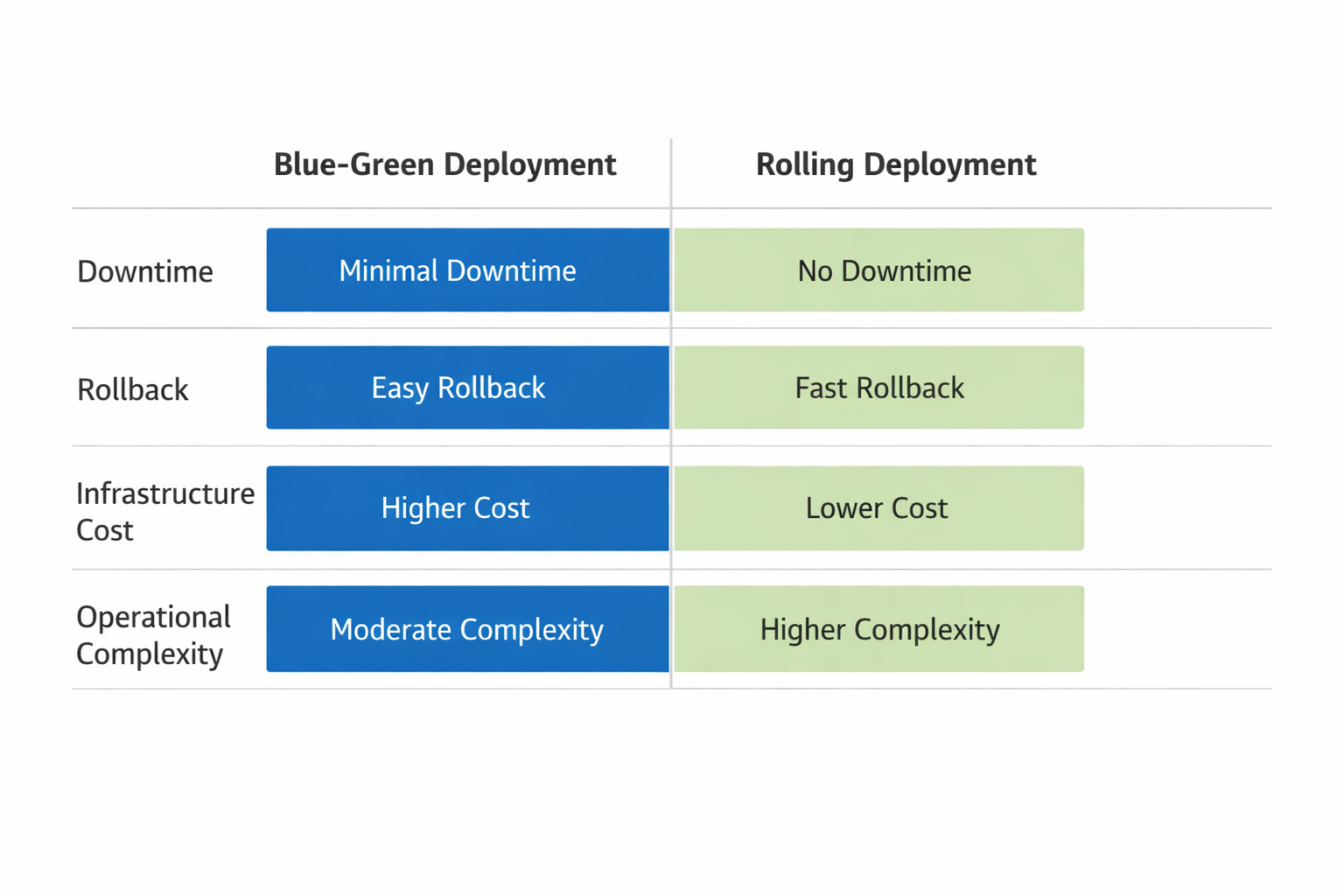
At a high level, blue-green and rolling deployments are both designed to reduce release risk, but they optimize for different outcomes. Blue-green prioritizes fast cutover and fast rollback. Rolling prioritizes lower cost and gradual capacity transition. Microsoft’s safe deployment guidance and AWS’s blue-green documentation both emphasize reduced user impact and traffic shifting, while Kubernetes’ rolling update docs emphasize incremental updates and zero downtime. (learn.microsoft.com)
Downtime risk: Blue-green can deliver very low downtime risk if traffic switching is clean and the new environment is ready. Rolling can also be zero-downtime, but only if capacity, readiness, and version compatibility are managed carefully. If one batch fails during a rolling update, you may end up with a partial rollout and a mixed-version fleet. (docs.aws.amazon.com)
Rollback speed: Blue-green is usually faster. You can route traffic back to the old environment almost immediately. Rolling rollback is typically slower because you may need to revert pods, instances, or task sets in place. (docs.aws.amazon.com)
Cost: Blue-green is more expensive in the short term because you keep two production-capable environments alive. Rolling is usually more cost-efficient because it updates existing capacity in place. (learn.microsoft.com)
Complexity: Blue-green requires duplicate environments, routing logic, and more discipline around environment parity. Rolling requires careful orchestration of batch updates and strong compatibility between versions. Neither is “simple”; they are just complex in different ways. (learn.microsoft.com)
Observability needs: Blue-green needs excellent health checks and traffic monitoring to validate the new environment before and after cutover. Rolling needs strong per-instance monitoring because issues can appear gradually as only part of the fleet changes at a time. Microsoft’s guidance on bake time underscores the value of observing real-world behavior during rollout phases. (learn.microsoft.com)
When Blue-Green Is the Better Choice
Blue-green is usually the better choice when the cost of a bad release is high. That includes high-traffic apps, public-facing platforms, regulated environments, and critical business systems where even a short disruption can damage customer trust or revenue. AWS explicitly positions blue-green as a way to reduce downtime and improve rollback capability, which is especially useful when a release must be reversible in seconds rather than minutes. (docs.aws.amazon.com)
It is also a strong fit for teams that need a very clear validation step before exposure. If your release includes major UI changes, auth flows, payments, compliance-sensitive behavior, or infrastructure changes that are hard to undo, blue-green gives you a clean staging lane in production. You can test the green environment under controlled conditions, verify logs and metrics, and then switch traffic once you are comfortable. Microsoft’s mission-critical guidance also points to blue-green as a pattern for safer deployment and testing in high-stakes environments. (learn.microsoft.com)
The other major reason to choose blue-green is rollback pressure. If your team needs to restore service quickly after a failure, a preserved old environment is often the most operationally friendly safety net. That matters for teams with strict uptime objectives, incident response constraints, or release windows that leave little room for troubleshooting. Blue-green’s main penalty is cost, so it becomes most compelling when reliability is worth more than duplicated infrastructure. (docs.aws.amazon.com)
When Rolling Is the Better Choice
Rolling deployment is often the better fit for cost-sensitive teams and organizations that want to avoid running duplicate production environments. If your workload is relatively stable, your release changes are small and frequent, and your budget matters, rolling updates can provide a strong balance between safety and efficiency. Kubernetes supports this model natively, which is one reason it is such a common default in containerized environments. (kubernetes.io)
Rolling also works well for microservices teams that deploy independently and frequently. When services are small, stateless, and designed for backward compatibility, gradual replacement can be a natural part of the delivery pipeline. Because each update affects only part of the fleet at a time, you can catch issues early without paying the full duplication cost of blue-green. This aligns well with teams that already use readiness probes, health checks, and automated rollback scripts in their cluster tooling. (kubernetes.io)
Another advantage is smoother capacity usage. Instead of carrying two full environments, you shift instances over time and keep your resource usage closer to normal. For teams operating at scale, especially in cloud environments where idle capacity still costs money, this can be a meaningful operational benefit. Rolling is not as instantly reversible as blue-green, but it is often “good enough” when releases are small, compatibility is strong, and your monitoring is mature. (kubernetes.io)
Operational Considerations
The release strategy you choose is only as good as the operational foundation underneath it. Databases are usually the hardest part. Blue-green and rolling both become riskier when schema changes are not backward compatible, because old and new application versions may need to read and write the same data during the transition. AWS explicitly calls out data tier and schema synchronization as important considerations for blue-green deployments, and that warning applies equally to rolling rollouts. (docs.aws.amazon.com)
Stateful workloads need extra care because traffic shifting does not solve state transfer. If application state lives in local memory, local disk, or tightly coupled session stores, your deployment strategy can only do so much. Teams often pair either strategy with external state stores, session replication, or careful draining behavior to avoid user disruption. Health checks also matter more than people expect: a deployment can look healthy from a container standpoint while still failing at the business-logic level. That is why readiness probes, synthetic transactions, and post-deploy smoke tests are so valuable. (learn.microsoft.com)
Feature flags can reduce pressure on the deployment mechanism itself. Instead of making the release strategy carry all the risk, you can deploy code dark and gradually enable functionality for subsets of users. Microsoft’s guidance notes that feature flags are typically used in canary-style progressive exposure, and the same idea helps blue-green and rolling strategies by separating code deployment from feature exposure. Traffic routing is another critical layer: load balancers, reverse proxies, and cloud traffic managers need to be part of the design, not an afterthought. Finally, automated testing should not end at unit and integration tests. Smoke tests, canary checks, and post-switch validation are the practical tools that make both strategies safer. (learn.microsoft.com)
Common Pitfalls and Failure Modes
One common failure mode is config drift. Blue-green environments are supposed to be identical except for version differences, but in practice, differences in environment variables, secrets, IAM permissions, network rules, or dependency versions can cause the green environment to behave differently from blue. That means your “safe” cutover is not really safe unless environment parity is actively enforced. Microsoft’s blue-green guidance stresses identical pools, and that requirement exists for a reason. (learn.microsoft.com)
Another pitfall is slow or incomplete rollback. Teams sometimes assume rollback is instant, but that is only true if the old version still works with the current data and surrounding services. If the new release already migrated data, changed APIs, or updated message formats, going back may not restore full functionality. This is one reason schema compatibility and staged migration patterns matter so much in real systems. AWS specifically highlights data synchronization and schema change considerations in blue-green deployments. (docs.aws.amazon.com)
Hidden compatibility issues are especially dangerous in rolling updates because old and new versions may run side by side for some time. If one version expects a field or behavior that the other version does not provide, you can get intermittent bugs that are hard to reproduce. Another issue is uneven user experience: during a rollout, some users may hit old behavior while others see new behavior, which can confuse support teams and complicate debugging. Microsoft’s guidance on bake time is useful here because it acknowledges that you need enough time between rollout phases to observe behavior across regions and usage patterns. (learn.microsoft.com)
The general lesson is simple: deployment strategy does not replace good engineering hygiene. It amplifies it. If your tests are weak, your observability is thin, or your services are tightly coupled, neither blue-green nor rolling will magically save you. They will only make the failure mode more or less visible. (learn.microsoft.com)
Decision Framework and Conclusion
A practical way to choose between blue-green and rolling is to ask four questions.
First, how much risk can you tolerate per release? If the answer is “very little,” blue-green usually wins because it gives you the fastest clean rollback and the clearest cutover. Second, how much infrastructure can you afford to duplicate? If the answer is “not much,” rolling is usually the more economical choice. Third, how mature is your tooling? If you have strong traffic routing, health checks, and environment parity, blue-green becomes easier to trust. If you have a solid Kubernetes platform with readiness probes and disciplined incremental rollout practices, rolling may be the smoother operational path. Fourth, how complex are your dependencies? The more stateful and tightly coupled the system, the more carefully you need to manage either strategy. (learn.microsoft.com)
In the end, blue-green is best when release safety and instant rollback matter most. Rolling is best when cost control, gradual exposure, and Kubernetes-native workflows matter most. Many teams eventually adopt both: blue-green for major launches or critical changes, rolling for everyday releases. That hybrid approach reflects the reality of modern delivery. The “best” deployment strategy is not the one that sounds most advanced. It is the one that matches your scale, your risk tolerance, your budget, and your ability to operate the system confidently every time you ship. (learn.microsoft.com)
References
Architecture strategies for safe deployment practices - Microsoft Azure Well-Architected Framework
Blue/Green Deployments using Azure Front Door | Microsoft Learn
Blue-Green Deployment in Azure Container Apps | Microsoft Learn
Deployment and testing for mission-critical workloads on Azure - Azure Architecture Center