
Beyond MCP: How AI Agents Are Moving From Chat to Controlled Action
May 22, 2026
AI assistants have gotten very good at answering questions. They can summarize a meeting, draft an email, and explain a policy in plain English. But real work usually isn’t just about generating text — it’s about taking the right action inside the right systems, with the right permissions, and leaving behind a trail you can trust. That’s where the conversation is changing.
Model Context Protocol, or MCP, has become one of the most important standards in that shift. Anthropic describes MCP as an open protocol for standardizing how applications provide context to LLMs, and compares it to a “USB-C port for AI applications.” OpenAI now supports remote MCP servers in its Responses API and has introduced MCP support in ChatGPT workflows and developer mode. Meanwhile, the MCP ecosystem now includes an official registry and official SDKs across major languages, signaling that this is no longer just an experiment — it is becoming infrastructure. (docs.anthropic.com)
The big idea is simple: chat is useful, but controlled action is transformative. A model can suggest that a sales rep update a CRM record, check a support ticket, and draft a follow-up message — but a useful agent must also discover the right tool, ask for the right scope, execute safely, and log what happened. That is the shift from “smart chat” to “operational software.” In this post, we’ll break down what changed, how MCP fits into the new stack, and what teams should do now.

1. Why “smart chat” still isn’t enough for real work
The gap between model output and task execution is bigger than it looks. A chatbot can say, “I’ll update the CRM, check the ticket, and draft a follow-up,” but unless it can actually call the CRM, inspect the ticketing system, and write the email draft in the right place, the user still has to do the work manually. That means copy-pasting, switching tabs, remembering field names, checking statuses, and making sure nothing was missed. In other words, the assistant is helping with thinking, but not with doing.
Consider a common sales or support scenario. A user tells an AI assistant: “Update the CRM for Acme Corp, check ticket #4821, and draft a follow-up to the customer.” A plain chat model might produce a polished response that describes the update, but the user still has to open the CRM, find the account, enter the notes, locate the ticket in support software, read the latest activity, and then compose the email. A more capable agent, by contrast, can determine that it needs access to three systems, fetch the relevant data, confirm whether it has permission to write, and then complete each step with a record of what changed. OpenAI’s ChatGPT developer mode documentation explicitly frames this as moving beyond read/search into workflows that can create tasks, update CRMs, and orchestrate actions across tools. (help.openai.com)
This difference matters because work is not just language — it is state. Real business systems have accounts, tickets, records, permissions, and side effects. A response that sounds correct is not the same as an action that is correct. A model may be able to infer the right next step, but it still needs structured access to systems, scoped authorization, and predictable behavior. That is why the industry is moving from chat interfaces toward agentic workflows that treat language as the control layer for operations, not the operations themselves.
2. The new AI stack: model, context, tools, and permissions
To understand modern agent systems, it helps to think in four layers.
Model
The model is the reasoning engine. It interprets the request, decides what information is missing, and chooses what to do next. It is not the whole product; it is the brain inside the system. By itself, a model can only reason over the information in front of it.
Context
Context is the information the model can see right now: the user’s request, prior conversation, retrieved documents, memory, and structured data from systems. Anthropic’s MCP documentation describes MCP as a standard way for applications to provide context to LLMs, and OpenAI’s docs and products similarly position MCP servers as a way to bring external documentation, data, and tools into the model’s working context. (docs.anthropic.com)
Tools
Tools are the actions the model can trigger: search, read a CRM record, create a ticket, update a field, generate a design file, or submit a deployment step. This is where “chat” becomes “workflow.” OpenAI’s recent MCP support and Anthropic’s SDK guidance both show MCP servers being used to expose concrete tools, not just documents. (openai.com)
Permissions
Permissions decide what the model is allowed to do. This is the guardrail layer: read-only versus write access, scoped tokens, approval flows, restricted domains, and administrative controls. OpenAI’s guidance on MCP security explicitly warns about prompt injection, exfiltration, and the danger of connecting to unofficial third-party servers when official ones exist. (platform.openai.com)
Traditional app integrations usually hard-code a one-to-one connection between two products, often with fixed scopes and brittle assumptions. The new stack is more modular. The model reasons, the context provides relevant information, tools expose capabilities, and permissions determine what actions are safe. That separation is important because it lets teams reuse the same model across many workflows while keeping control over what can be read, written, and approved.
3. What’s changed in 2026: MCP moved from experiment to ecosystem
In 2026, MCP looks much less like a niche developer idea and much more like a growing ecosystem. The clearest signal is institutional support. Anthropic announced that MCP was being donated to the Agentic AI Foundation under the Linux Foundation, with support from major industry players including OpenAI, Google, Microsoft, AWS, Cloudflare, and Bloomberg. In the same announcement, Anthropic said MCP now has an official community-driven registry and official SDKs for major languages. (anthropic.com)
That registry matters because discoverability is what turns a protocol into a platform. A protocol on its own is just a specification. A protocol plus registries, SDKs, and product integrations becomes an ecosystem. The official MCP Registry is now publicly accessible, making it easier to discover servers and their connection details. GitHub’s MCP organization also shows active official SDKs and tooling across multiple languages, including Python, Java, C#, Go, Rust, and Swift. (prod.registry.modelcontextprotocol.io)
Adoption inside products is also accelerating. Anthropic supports MCP in Claude products and SDKs, while OpenAI now documents MCP support in both its API ecosystem and ChatGPT-related workflows. OpenAI’s Responses API supports remote MCP servers, and ChatGPT developer mode enables organizations to build and publish MCP-powered apps that can take actions in company tools. OpenAI’s February 2026 Figma partnership is another sign of the direction of travel: the integration uses MCP to connect Codex directly to design workflows. (docs.anthropic.com)
The practical takeaway is that MCP is no longer only about “can we connect an AI to a tool?” It is increasingly about “which tool, who trusts it, what can it do, and how do we govern it?” That is an ecosystem question, not just a protocol question.
4. A practical architecture for agentic workflows
A secure agentic workflow should not feel mysterious. It should look like a controlled pipeline.
Step 1: User request
The user asks for a goal, not a script. For example: “Update Acme’s CRM record, check the latest ticket status, and draft a follow-up email.”
Step 2: Tool discovery
The agent identifies which systems are relevant. It may need a CRM connector, a support connector, and an email drafting tool. In MCP terms, this is where the client discovers available servers and their capabilities through a standardized interface. The registry and server metadata help here. (prod.registry.modelcontextprotocol.io)
Step 3: Server selection
The system chooses the right server for each task. This matters because official or vendor-hosted servers are safer than random third-party copies when the action touches sensitive business systems. OpenAI explicitly recommends preferring official servers hosted by the service provider itself. (platform.openai.com)
Step 4: Scoped auth
The user or administrator grants only the scopes needed. Read-only access should be the default for exploration and lookup. Write permissions should be narrow, explicit, and time-bound.
Step 5: Action execution
The agent performs the task in a controlled sequence. It reads the record, checks the ticket, drafts the message, and only then writes anything back if it has permission and confidence.
Step 6: Audit logging
Every important action should be logged: what was requested, which server was called, what data was read, what changed, and who approved it. This is essential for debugging, compliance, and trust.
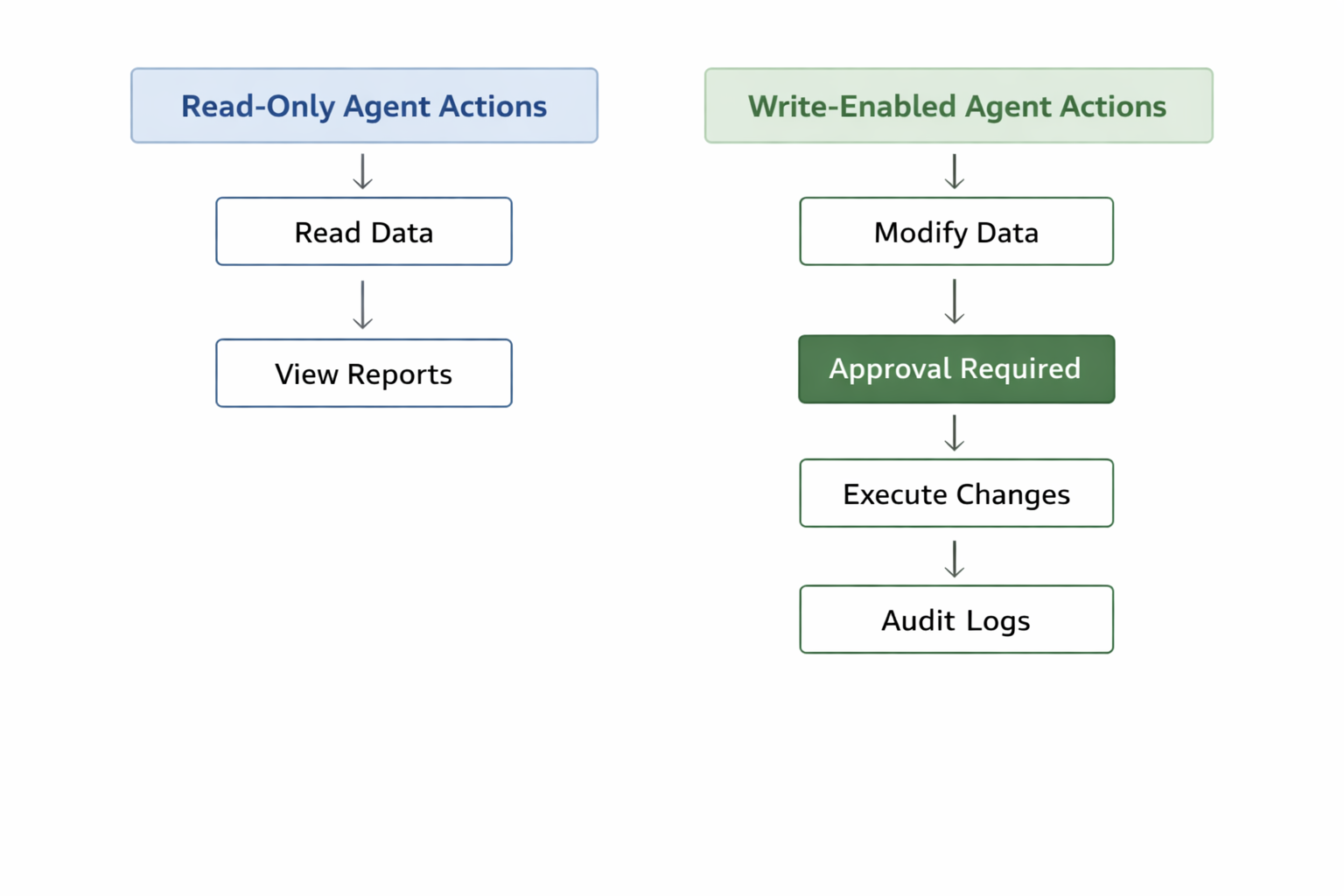
The best architecture is not the one with the most automation. It is the one that makes automation legible. If an action cannot be traced, reviewed, or revoked, it is not enterprise-grade automation — it is a liability.
5. Where MCP fits best today
MCP is especially valuable where work spans multiple systems and the friction comes from moving between them.
Sales ops
Sales teams often live in CRM records, notes, calendar tools, and email. MCP can help an agent retrieve account history, summarize pipeline changes, draft follow-ups, and prepare meeting notes. OpenAI’s own ChatGPT developer mode examples explicitly mention updating CRM workflows and coordinating across tools. (help.openai.com)
Internal knowledge search
Companies have policy docs, product specs, meeting notes, and support articles scattered across systems. MCP is a strong fit for surfacing that information through a single assistant, especially when the server is read-only and designed for search or retrieval. OpenAI’s documentation server is a good example of a read-only MCP use case. (platform.openai.com)
Design-to-code workflows
This is one of the clearest emerging patterns. OpenAI’s Figma partnership uses MCP so Codex can move between implementation in code and exploration in the design canvas. That makes MCP useful not just for retrieval, but for structured creative iteration across disciplines. (openai.com)
Support automation
Support teams can use MCP to read ticket history, classify issues, summarize customer context, and draft responses. With the right permissions, an agent can also route, tag, or escalate tickets — but only with strong guardrails.
Developer tooling
Developers benefit from connectors to docs, repositories, code review tools, and local project utilities. Anthropic’s SDK docs show MCP servers extending Claude Code with filesystem and external-process capabilities, which points to a broader class of developer workflows beyond chat. (docs.anthropic.com)
The pattern across all these use cases is the same: MCP is strongest where the assistant needs to understand the task in context and then act in a system of record.
6. The real risks: prompt injection, over-permissioning, and shadow integrations
The power of agent access is also the reason it is risky. If an assistant can read data from one system and write to another, a malicious instruction hidden inside retrieved content can potentially influence what it does next. OpenAI’s MCP guidance specifically highlights prompt injection scenarios where an attacker uses one connector to manipulate the model into exfiltrating data through another. (platform.openai.com)
That leads to three major risks.
Prompt injection
A model may encounter instructions embedded in a document, ticket, email, or web page that try to override the user’s intent. If the system does not separate trusted instructions from untrusted content, the agent can be tricked.
Over-permissioning
The most dangerous default is giving an agent broad write access because it is “convenient.” A tool that only needs read access should never have write access. A connector that only needs one project should not see the whole workspace.
Shadow integrations
Teams sometimes connect unapproved third-party servers because they are easy to find. That creates hidden data flows, unclear ownership, and compliance blind spots. OpenAI’s docs warn that custom MCP servers are third-party services and advise choosing official servers hosted by the provider whenever possible. (platform.openai.com)
The most important guardrails are straightforward: use least privilege, separate read from write, require approvals for sensitive actions, log every action, and review tool outputs before they become inputs to other actions. In agent systems, safety is not a feature you add later. It is part of the architecture.
7. How to evaluate an MCP server before connecting it
Before connecting any MCP server, teams should treat it like they would any external system that can access business data.
1. Provider trust
Who built it? Is it official, vendor-hosted, or third-party? Prefer official servers hosted by the service provider when available. OpenAI explicitly recommends this approach. (platform.openai.com)
2. Least-privilege scopes
What does the server actually need? If it only needs to search or read records, it should not ask for write access. If it needs to write, the scopes should be narrow and documented.
3. Read-only vs write access
Read-only servers are far easier to approve and monitor. Write access should be a separate decision with more review, especially for systems of record like CRM, support, finance, or identity.
4. Logging and auditability
Can you see what the server did? Can you trace inputs, outputs, timestamps, and user approvals? If not, that is a red flag.
5. Data handling and retention
What data does the server store, transmit, or cache? How long is it retained? Is it used for training? These questions matter even if the product is helpful.
6. Admin controls
Can security teams restrict which servers are allowed, which users may connect them, and which actions require approval? Enterprise adoption depends on this.
7. Official listing or ecosystem presence
Is the server in an official registry or published by a recognized provider? The MCP Registry and official SDK ecosystem make it easier to identify legitimate implementations. (prod.registry.modelcontextprotocol.io)
A good rule is simple: if you would hesitate to give a human contractor access to the same system under the same terms, you should hesitate to give the server access too.
8. What enterprises should build now
Enterprises should not try to automate everything at once. The safest path is phased rollout.
Phase 1: Read-only discovery
Start with use cases that only search or summarize. Examples include policy lookup, document retrieval, and ticket triage. This builds user trust and exposes integration issues without write risk.
Phase 2: Limited write actions
Move to narrow actions such as drafting a CRM note, creating a support task in a sandbox, or preparing a change request that requires human review. The goal is to prove that the workflow is reliable under supervision.
Phase 3: Monitored automation with approvals
Only after the team has established clear logging, approval flows, and failure handling should it allow higher-value automations. Even then, sensitive actions should require confirmation or be limited by rules. OpenAI’s ChatGPT developer mode guidance reflects this enterprise-first pattern by emphasizing private testing, review, publication, and the move from search-only behavior toward write-capable actions. (help.openai.com)
Enterprises should also build an internal governance layer around MCP usage: approved server lists, scope templates, incident response playbooks, and periodic access reviews. The most successful teams will treat agent access the way they treat production identity and API access today — with policy, telemetry, and accountability.
9. What this means for product teams and content teams
For product teams, the interface shift is profound. If AI systems can reach into tools directly, the interface is no longer just a chat window. It becomes a workspace that can both answer and act. That means users will increasingly expect the AI to understand not only what they asked, but which system they are working in, what state the workflow is in, and what the next safe action should be.
For content teams, structure matters more than ever. Clear headings, metadata, summaries, field labels, and machine-readable organization help agents retrieve the right information and avoid confusion. In a tool-aware world, content is not only for humans scanning a page; it is also for systems deciding what to do next.
This is one reason MCP is so important. It gives AI systems a standardized way to connect to external context, but the quality of that context depends on how information is organized. A messy document, a vague ticket template, or inconsistent metadata makes the agent less reliable. A well-structured knowledge base makes it more useful.
Product teams should therefore think beyond “Can the model answer this?” and ask, “Can the model safely operate here?” Content teams should ask, “Can a machine understand this as well as a human?” The answers will shape whether AI becomes a novelty layer or a durable interface for work.
10. The future: from “model context” to “business context”
The next phase of agent adoption will not be won by the biggest model alone. It will be won by systems that combine standards, governance, and real operational context.
That is the deeper meaning of the MCP shift. “Model context” is about what the AI can see. “Business context” is about what the AI should understand: the company’s systems, permissions, rules, approval chains, data boundaries, and workflow norms. A truly useful agent does not just know language. It knows where it is acting, what is allowed, and what outcome matters.
The ecosystem is already moving in that direction. MCP has official registries, SDKs, and major product support. OpenAI is adding remote MCP support and enterprise-oriented developer mode features. Anthropic has helped move MCP toward foundation-level governance through the Agentic AI Foundation. Together, these changes suggest that the winning stack will not be “just chat with more tokens.” It will be a carefully governed operational layer where language becomes a reliable interface to action. (anthropic.com)
Conclusion
AI agents are moving beyond conversation because organizations do not need more generic answers — they need trustworthy execution. MCP is helping make that possible by standardizing how models discover tools, access context, and act across systems. But the real breakthrough is not merely connectivity. It is controlled action: scoped, logged, approved, and aligned with business reality.
The teams that win will start small, keep permissions tight, and build around governance from day one. They will choose official servers where possible, favor read-only access before write access, and design workflows that are easy to audit. And they will recognize that the future of AI is not just bigger models or prettier chat interfaces. It is business context made operational.