AI App Infrastructure in 2026: GPUs, Queues, Storage, and Background Jobs
August 25, 2026
AI apps have evolved far beyond simple chat interfaces. In 2026, many production systems are not just answering questions — they are coordinating retrieval, tool use, document processing, long-running reasoning, evaluation loops, and multi-step agent workflows. That shift changes the infrastructure problem dramatically. The bottleneck is no longer just “can I call a model?” It is “can I move the right data to the right accelerator, at the right time, without wasting money or blowing up latency?”
Modern AI stacks now need to coordinate GPUs, memory, storage, networking, orchestration, and job systems as a single throughput engine. The best systems treat tokens, tasks, and data movement as first-class operational concerns. That means careful queue design, smarter GPU capacity planning, faster storage paths, strong observability, and security boundaries that work in multi-tenant environments. Hardware matters, but so does the software logic that decides what runs interactively, what runs asynchronously, and what gets routed to specialized infrastructure.
This blog post breaks down the practical architecture patterns behind today’s AI applications and shows how teams are building systems that are faster, more resilient, and more cost-aware than the first wave of chatbot apps.

1. Why AI app infrastructure is changing fast
The biggest change in AI infrastructure is that workloads are becoming more stateful, multi-step, and mixed in latency requirements. Early chatbot systems were often simple request-response applications: a user typed a prompt, the app called a model, and the response came back. Today’s AI apps are frequently agentic workflows that may retrieve documents, call tools, inspect files, summarize results, generate code, run evaluations, and continue the process across multiple steps. That means the infrastructure must support not only inference, but also coordination.
This shift affects every layer of the stack. GPUs are the obvious compute engine, but they are only part of the story. Memory matters because long context windows and retrieval-heavy apps keep more state in flight. Storage matters because agents often ingest files, load embeddings, and fetch large corpora. Networking matters because model servers, vector stores, job queues, and data stores are distributed. Orchestration matters because the system needs to decide which tasks are synchronous, which are background jobs, which can be retried, and which should be prioritized for latency.
A useful way to think about this is that AI applications are becoming traffic systems rather than simple APIs. Some requests are “ambulances” that must get through immediately. Others are “freight trucks” that can move later without hurting the user experience. That is why infrastructure teams now design around queues, worker pools, storage tiers, and routing layers instead of treating the model endpoint as the whole product. NVIDIA’s GPUDirect Storage documentation, for example, frames storage-to-GPU movement as a direct data path problem because CPU bounce buffering can become a bottleneck in data-heavy systems. (docs.nvidia.com)
2. GPU demand and capacity planning
GPU planning in 2026 is less about chasing peak throughput and more about right-sizing capacity for real application demand. Many teams learned that a large fleet of expensive accelerators does not automatically produce a good user experience. If traffic is bursty, context lengths vary, and requests have very different latency requirements, a GPU cluster can be underutilized even while users see slowdowns. That is why cost per token has become one of the most useful operational metrics. It ties infrastructure spending to the actual unit of work that AI applications produce.
Right-sizing also means recognizing that different workloads want different accelerator profiles. Training, fine-tuning, batch embedding generation, and low-latency inference rarely need the same hardware in the same quantities. Specialized inference hardware has become increasingly important because many organizations now optimize for throughput per dollar, not just raw peak performance. In practice, that means some workloads belong on high-end GPUs, some on inference-optimized accelerators, and some on CPU-side systems when latency requirements allow it. The objective is not to maximize GPU use at all times; it is to maximize useful work per dollar while preserving user experience.
Capacity planning also needs to account for queue depth, model size, context length, and batching behavior. A system that looks efficient in a benchmark can become expensive in production if prompt sizes vary widely or if background jobs compete with live user traffic. Teams increasingly separate online and offline capacity so that batch jobs do not steal compute from interactive requests. This is where cost per token becomes more actionable than peak tokens per second: it reflects the real economic outcome of how work is scheduled, batched, cached, and routed. OpenAI’s public guidance on API usage rate limits is a reminder that AI systems are constrained not just by hardware, but also by service-level and request-level controls that influence throughput planning. (help.openai.com)
3. Queue design for AI workloads
Queue design is now one of the most important parts of AI app architecture because AI workloads are inherently bursty. A single user action can fan out into multiple requests: a search query, embedding generation, reranking, summarization, tool calls, or background evaluation. If all of those tasks hit the same synchronous path, latency spikes and cost rises quickly. The simplest and most effective pattern is to separate interactive requests from batch or background work.
Interactive traffic should be protected first. That means requests serving the user’s current screen, conversation, or agent step should have priority over non-urgent work like indexing, report generation, or model evaluation. A queue can enforce that priority by keeping separate lanes for live and offline jobs, with dedicated worker pools or explicit priority classes. This protects GPU utilization under bursty demand because the system can keep accelerators busy with the right kind of work rather than allowing noisy background jobs to dominate the queue.
There is also a batching opportunity here. AI inference often benefits from micro-batching, but only when it does not increase visible latency too much. A well-designed queue can accumulate enough requests to improve throughput while still honoring latency budgets for premium or interactive traffic. In practice, this means setting queue timeouts, backpressure rules, retries, and fallbacks carefully. If a queue grows too deep, you may want to shed load, degrade gracefully, or shift certain work to asynchronous completion instead of forcing every request through the same live path.
The main architectural lesson is that queues are not just plumbing. They are policy. They encode what the application considers urgent, what can wait, and what should be retried later. For AI systems with variable request sizes and expensive accelerators, that policy is a major driver of both user experience and cost efficiency.
4. Storage for AI apps
Storage is often underestimated in AI architecture because the visible bottleneck is usually the model. But in production, the data path can become just as important as compute. AI apps deal with prompt histories, uploaded documents, embeddings, vector indexes, output artifacts, logs, evaluation traces, and model checkpoints. When those data flows are large or frequent, storage architecture can determine whether GPUs stay busy or sit idle waiting on I/O.
Fast object storage is the default backbone for durable, scalable AI data. Amazon S3, for example, is designed for high request rates and can scale through parallel requests and prefixes; AWS documents that each prefix can support at least 3,500 PUT/COPY/POST/DELETE or 5,500 GET/HEAD requests per second, with parallelization used to scale further. (docs.aws.amazon.com) But object storage alone is not always enough for low-latency inference paths. That is where NVMe tiers, local caches, and memory-backed indexes matter.
Vector indexes add another layer. Retrieval-augmented generation systems depend on searching embeddings quickly enough that retrieval does not dominate total response time. If your vector store is slow, your “AI” app can become a “wait for retrieval” app. A common pattern is to keep hot indexes or hot shards on faster storage tiers, while colder data lives in cheaper object storage. This allows the system to balance cost and responsiveness.
GPU-direct data paths are another major trend. NVIDIA’s GPUDirect Storage documentation explains that GDS enables direct DMA transfers between GPU memory and storage, avoiding a CPU bounce buffer and reducing latency and CPU utilization. That matters when large context windows or agent workflows need to move a lot of data quickly. (docs.nvidia.com)
5. Background jobs and asynchronous workflows
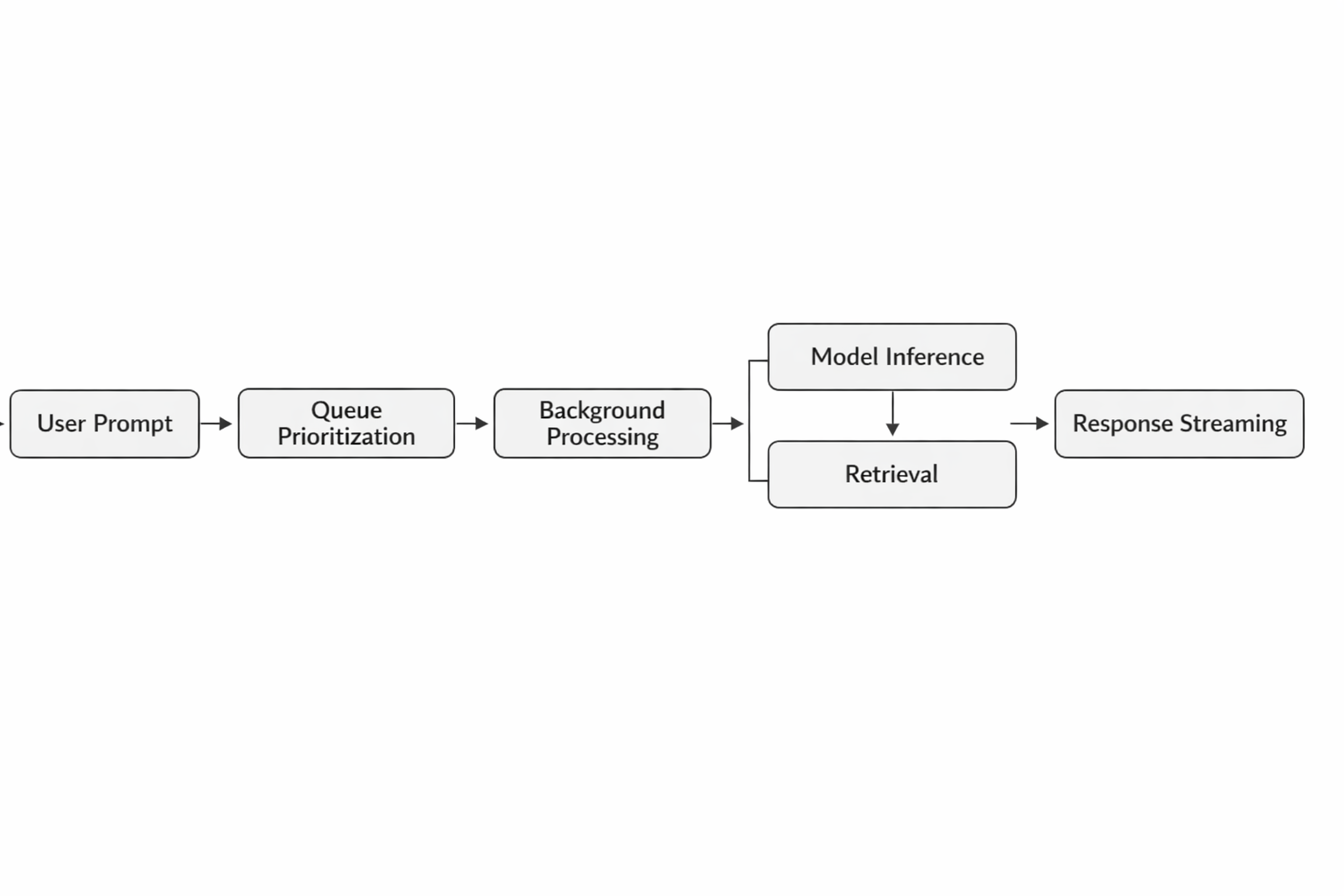
A strong AI platform knows what not to do in the request-response path. Many tasks are better offloaded to background workers because they are important but not urgent. Embedding generation is a classic example: if a user uploads a large document set, the app can accept the upload immediately and generate embeddings asynchronously. The same applies to document ingestion, indexing, evaluation runs, report generation, and some forms of fine-tuning preparation.
This separation improves latency, reliability, and cost control. If every upload waits for every downstream step to finish, the user experiences unnecessary blocking and the system becomes fragile under load. By contrast, asynchronous workflows can be retried independently, scaled by worker pool, and monitored with dedicated SLAs. Background jobs also make it easier to isolate failures. If report generation fails, the user’s core experience is still intact, and the retry logic can run without impacting live traffic.
There is also a practical GPU efficiency angle. Embedding jobs, evaluation jobs, and batch preprocessing often have different shape characteristics than live inference. They can be grouped, scheduled, and run in larger batches to improve throughput. That is especially useful if the organization maintains separate offline capacity. In many mature systems, online requests and offline tasks share the same general platform but not the same execution lane.
Another reason to favor background jobs is workflow composition. AI apps often need multi-step processing that may depend on external APIs, file parsing, or human review. Async orchestration gives you checkpoints, resumability, and observability across each step. Instead of building a giant synchronous endpoint, you build a workflow that can pause, resume, and continue when resources are available. This is a much better fit for agentic applications that may take seconds or minutes, not milliseconds.
6. Retrieval and serving architecture
At production scale, retrieval and serving are usually separate layers, even though they feel like one experience to the user. The retrieval side handles searching documents, vector indexes, metadata stores, and permission filters. The serving side handles model execution, prompt assembly, response streaming, and routing decisions. Keeping those layers distinct improves performance and reliability because each can be tuned for its own job.
A modern retrieval architecture usually includes vector search, a metadata filter layer, and a serving gateway that decides which model or replica should handle the request. The vector search engine finds likely relevant chunks, the gateway assembles context, and the model server produces the answer. Replica routing becomes important because not every request needs the same model or the same level of compute. Smaller models may be sufficient for classification or rewriting, while larger models are reserved for complex reasoning or long-context tasks.
Inference gateways are especially useful because they centralize policy. They can manage rate limits, routing, retries, fallback models, caching, and observability. They also help absorb the complexity of multi-model systems where one app might use different models for summarization, extraction, generation, or ranking. This is one reason production AI systems rarely look like a single endpoint anymore. They look more like a service mesh with model-aware routing.
Serving layers must also protect latency. A fast retrieval path is useless if the model server cannot keep up or if one noisy tenant floods the system. That is why replica routing, admission control, and queueing must work together. The best systems are responsive because they avoid overloading any one component; they fail gracefully because they can route around congestion; and they stay cost-aware because they only use the largest models when they truly add value.
7. Observability and cost control
Observability in AI systems has to go beyond the usual API metrics. You still need request counts, errors, and p95 latency, but AI infrastructure also requires visibility into queue depth, GPU utilization, token throughput, tail latency, storage bloat, egress costs, and idle specialized hardware. If you only look at endpoint latency, you may miss the underlying cause: a queue that is growing, a storage tier that is too slow, or a GPU fleet that is mostly idle but still expensive.
Queue depth is one of the most useful leading indicators because it shows whether demand is outrunning capacity before users feel the pain. GPU utilization is similarly important, but it must be interpreted carefully. High utilization is not automatically good if it is achieved by sacrificing responsiveness. Conversely, low utilization can be acceptable if the system is intentionally reserving capacity for bursts or premium traffic. The real question is whether the system is producing enough tokens or completed tasks per dollar.
Token throughput helps connect business output to compute cost. It is often more meaningful than raw requests per second because AI workloads vary dramatically in prompt and completion length. Tail latency matters because a small percentage of slow requests can dominate the user experience. Storage bloat and egress costs matter because AI pipelines often duplicate inputs and outputs across caches, logs, backups, and data lakes. Specialized hardware can also become a cost trap if it sits idle between spikes.
The practical goal is to build dashboards and alerts that reflect workload economics, not just infrastructure health. A production AI system should make it easy to answer questions like: Which queue is growing fastest? Which model is most expensive per useful output? Which storage tier is creating the most latency? Which tenants are consuming the most expensive resources? Those answers are what let teams optimize instead of guessing.
8. Multi-tenant and secure AI operations
Multi-tenant AI systems introduce a difficult combination of concerns: they must be efficient, isolated, and secure at the same time. In practice, this means tenant-aware scheduling, policy controls, network isolation, resource quotas, and sometimes distinct pools for different classes of workloads. One tenant’s burst should not degrade another tenant’s experience, especially when high-cost accelerators are involved.
Isolation starts with clear boundaries in the control plane and data plane. Workloads may be separated by namespace, node pool, or even physical hardware depending on the sensitivity of the application. Tenant-aware scheduling helps ensure that requests are routed in accordance with policy, quota, and service tier. It also makes it possible to reserve certain capacities for premium users or regulated workloads.
Accelerators like DPUs are increasingly useful in this environment because they can offload networking and security tasks from CPUs. That matters in AI clusters, where CPUs are already busy handling orchestration, storage coordination, and data preprocessing. Offloading packet handling, encryption, and isolation tasks can improve overall efficiency and reduce contention. NVIDIA’s GPUDirect family documentation also underscores the broader theme: data movement matters, and direct paths between compute, storage, and networking can reduce bottlenecks. (docs.nvidia.com)
Security policy also has to adapt to AI-specific risks. Prompts may contain sensitive data, generated outputs may need filtering, and retrieval systems may need access control at the chunk level. That means policy enforcement should live close to the serving and retrieval layers, not just at the perimeter. In a multi-tenant AI platform, the best security design is one that is explicit, inspectable, and tied directly to how work is scheduled and routed.
9. Practical architecture patterns
There is no single best AI architecture, but there are practical patterns that fit different stages of maturity. Startups usually benefit from simplicity: one primary GPU pool, one queue system, one object store, and a basic background worker tier. That architecture keeps operational overhead low while allowing the team to validate product-market fit. The tradeoff is that live traffic and offline jobs may contend for resources, so the system needs simple priority rules and careful limits.
Mid-market teams often outgrow the single-pool model. At that point, it becomes useful to split online and offline pools. Interactive inference gets dedicated capacity, while batch tasks like embedding generation, document ingestion, evaluation, and reporting run separately. This separation improves predictability and makes cost attribution clearer. It is also the stage where teams often introduce an inference gateway, a vector search service, and stronger observability around per-tenant usage.
Enterprise systems usually need even more structure. They may use multiple model-serving tiers, strict tenant isolation, policy-based routing, and specialized hardware for different workloads. A common design is to reserve one pool for latency-sensitive traffic and another for offline processing. Within each pool, the scheduler can optimize for throughput, cost, or service class. Some enterprises also deploy faster storage tiers and direct data paths to reduce CPU bottlenecks in high-volume retrieval and inference workflows. NVIDIA’s GPUDirect Storage documentation is relevant here because it is explicitly aimed at moving data efficiently between storage and GPUs while reducing CPU overhead. (docs.nvidia.com)
If you are deciding between one GPU pool and separate online/offline pools, the rule of thumb is simple: keep one pool only if traffic is light, latency requirements are forgiving, and batch work is modest. Split pools when user-facing traffic becomes important enough that background jobs can no longer be allowed to compete with it. That decision usually arrives sooner than teams expect.
10. Future trends to watch
The next wave of AI infrastructure is likely to keep pushing toward more direct data movement, more specialized cloud ecosystems, and more token-aware scheduling. GPU-to-storage and GPU-to-network paths will continue to matter because AI systems increasingly spend time moving data rather than just computing on it. When context windows grow and agent workflows fan out, infrastructure that reduces copies and CPU overhead becomes much more attractive. NVIDIA’s GPUDirect Storage and related direct-path technologies point in that direction already. (docs.nvidia.com)
Another trend is the expansion of AI cloud ecosystems. Instead of one provider or one accelerator type dominating all use cases, teams are likely to mix and match cloud services, specialized chips, model providers, and retrieval systems. That will make portability, policy control, and observability even more important. The application layer will increasingly care about tasks and tokens rather than just models. A system will not simply “call a model”; it will route a task to the best available execution path.
Distributed agent workflows are also likely to become more common. Rather than a single monolithic assistant, companies will deploy fleets of specialized agents: one for retrieval, one for planning, one for execution, one for validation, and one for reporting. That future makes queues, background jobs, and workflow orchestration even more central. Infrastructure will be judged on how well it coordinates work across steps, tenants, and hardware classes.
The most important long-term shift is conceptual. AI infrastructure is moving away from a model-centric worldview and toward a workload-centric one. The key question is no longer “Which model should I deploy?” but “How do I optimize tokens, tasks, throughput, latency, and cost across the full pipeline?” Teams that answer that question well will build faster apps, serve more users, and spend less money doing it.
Conclusion
AI app infrastructure in 2026 is fundamentally about coordination. GPUs matter, but they are only one part of a larger system that includes queues, storage, background jobs, retrieval layers, observability, and security controls. The highest-performing teams are not simply buying faster hardware; they are designing smarter paths for data and work.
The practical takeaways are straightforward. Separate interactive traffic from background work. Right-size GPU fleets around real usage and cost per token. Use fast storage tiers and direct data paths where they matter. Treat observability as a business function, not just an engineering function. And design for multi-tenancy and policy from the start, especially if your AI system will serve multiple teams or customers.
As AI apps continue to shift from chatbots to agentic workflows, the winning stack will be the one that coordinates compute, memory, storage, and orchestration with minimal friction. In other words: the future belongs to infrastructure that is optimized not just for models, but for motion.